

Security and audit
This page explains how Thulu protects access and what trail it leaves. Use it to answer a security questionnaire or to decide how to configure a self-hosted install. Most of the model works without you doing anything; what you can adjust is marked in each section, with its screen or its environment variable.
Identity: Thulu doesn’t store passwords
Section titled “Identity: Thulu doesn’t store passwords”Thulu doesn’t authenticate anyone. There is no password, second factor or passkey to configure: sign-in happens at an OIDC identity provider (Okta, Microsoft Entra ID, Google, Keycloak or MisterD ID on the SaaS) or with GitHub, GitHub Enterprise Server included, and Thulu starts working when the provider returns an identity with a verified email. MFA, lockout after failed attempts and account recovery are the provider’s responsibility.
What does belong to Thulu: workspaces, each person’s roles and sessions after sign-in. While you use Thulu, the browser session renews itself every 30 minutes; if you go 7 days without signing in, or 30 days after sign-in (OCTOPUS_SESSION_MAX_LIFETIME on self-hosted), you have to sign in again. Each person sees and closes their sessions in “Settings → Account” (see Settings).
On a self-hosted install, who can sign in is decided with environment variables:
| Variable | What it is for |
|---|---|
OCTOPUS_OIDC_ISSUER, OCTOPUS_OIDC_CLIENT_ID, OCTOPUS_OIDC_CLIENT_SECRET, OCTOPUS_OIDC_REDIRECT_URI |
The OIDC provider (one per install) |
OCTOPUS_SSO_ALLOWED_DOMAINS |
Allowed email domains |
OCTOPUS_SSO_ALLOWED_GROUPS |
Allowed provider groups; removing someone from the group locks them out at their next sign-in |
OCTOPUS_OIDC_GROUP_ROLE_MAP |
Take the role from a provider group instead of assigning it by hand |
OCTOPUS_SSO_DEFAULT_WORKSPACE, OCTOPUS_SSO_DEFAULT_ROLE |
Which workspace and with which role someone new enters (viewer by default) |
OCTOPUS_SIGNUP_MODE=allowlist |
Only emails on a list can sign up (it is the one “Beta access” manages on the SaaS) |
thulu init asks about the provider at install time; the details are in Self-hosted install. What these variables resulted in appears, read only, in the “Sign-in” panel of “Settings → Members”.
Each person has a role per workspace. There are four roles and they are fixed; there are no custom roles.
| Role (in the UI) | Can |
|---|---|
| “viewer” | See tasks, boards, projects, agents and usage |
| “developer” | The above, plus create, edit and move tasks, comment, answer questions, decide approvals and relaunch or stop agents |
| “admin” | The above, plus delete tasks and manage projects, agents, skills, boards, credentials, webhooks, API keys, members and the audit log |
| “owner” | The above, plus hand the workspace to another person, delete it, connect the GitHub App and enable delegated chats |
The sections that cover the whole install (full Health, retention, Updates, Infrastructure, the telemetry address, the audit chain verification) belong to the operator workspace’s admin. Inviting people and changing roles is explained in Workspaces and team.
Keys: yours and each run’s
Section titled “Keys: yours and each run’s”There are two kinds of API key and neither works outside its workspace.
The ones you create in “Settings → API” carry a role (never higher than yours), a list of permissions and an expiry of 90 days at most by default. A call has to pass the role and the permission at once. Thulu stores only a hash of the key: if you lose it, there is no way to recover it. How they are created, rotated and revoked is in Settings.
Each run’s keys are created by Thulu on its own. Every container it starts (a stage, a chat, a mention, the auditor) receives its own key, which:
- has the developer role at most;
- lasts up to 24 hours and is revoked when the container ends;
- can only modify its task, the subtasks and siblings of its group and the tasks that run created;
- can request an approval but never approve, reject or delete it;
- can’t upload folders as projects or integrate branches of an uploaded project;
- only sees its own chat and the transcripts of the runs it can modify.
Each Evidence batch runs with a key that only works for that batch and is revoked when it finishes.
A chat with “Act for me” receives another key, valid for 8 hours, which can work on all boards with the person’s role (developer at most); its deletions wait for that person to confirm them. See Chat.
Which credentials the agent sees
Section titled “Which credentials the agent sees”- The model key: with the LLM gateway, on by default in the compose stacks and in Helm, the agent’s container receives a token of its own for the run and the daemon puts in the real key (or signs the request to Bedrock or Vertex). A Claude Pro/Max OAuth token doesn’t go through the gateway; only the operator workspace’s owner can load that token, and with agents on Kubernetes it is off unless
OCTOPUS_KUBE_ALLOW_CLAUDE_OAUTH_TOKEN=1. With a personal Claude session (Docker only), any agent container of that person’s runs can read the session. - MCPs: since 0.3.3 every MCP an agent uses goes through the daemon’s MCP proxy with the run’s key. The daemon decides on each request whether the run has that server granted, rejects tools outside the list and adds the credential; the container receives no MCP URLs or credentials.
argus-sandboxand the per-runargus-browserstay direct. See MCPs. - The GitHub token never enters the agent’s container, and since 0.3.3 it doesn’t enter the sandbox either. On Docker, the daemon does the commit and the push; on Kubernetes, the agent pushes its branch to Thulu and the daemon publishes it to GitHub with the project’s token. The GitHub tools agents use ask the server for the token on every call, with the GitHub App’s minimum permissions for that tool, and the ones that dispatch workflows, approve deployments or merge are granted only by name. Configuration in Git and GitHub and Credentials and engines.
On Docker, agents run with trimmed capabilities and on a network of their own, with no outbound internet filter. Egress control exists only on the Kubernetes runtime (open or proxy-only).
Stored secrets
Section titled “Stored secrets”Model keys, AWS, Google Cloud, GitHub and MCP credentials, the GitHub App’s private key and webhook secrets are stored encrypted (AES-256-GCM). On self-hosted, the encryption key is OCTOPUS_SECRETBOX_KEY; to rotate it, the old one moves to OCTOPUS_SECRETBOX_PREVIOUS_KEYS and the next start re-encrypts everything. The rest of the database (tasks, chats, transcripts) isn’t encrypted by Thulu: if you need that, use a volume or a managed Postgres with encryption at rest.
The audit log
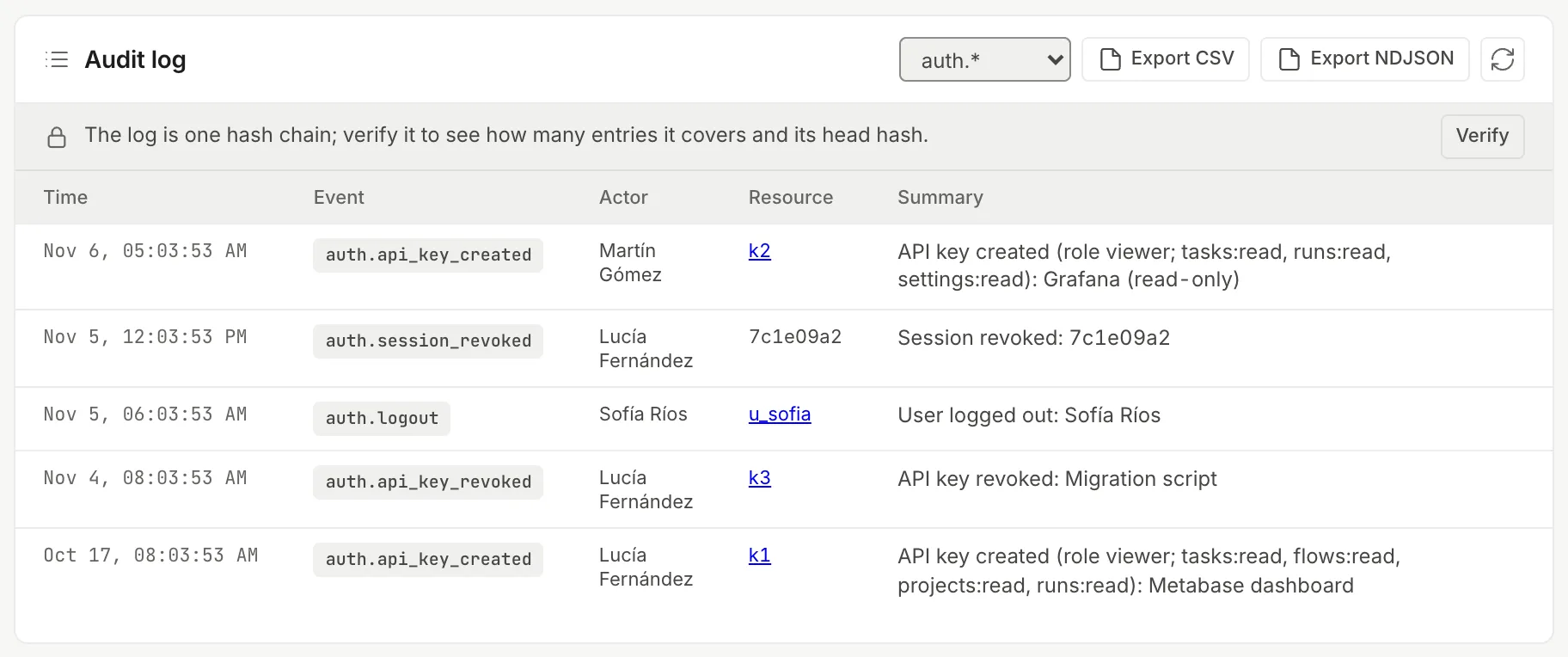
Section titled “The audit log”Every administrative action is recorded in the workspace’s log: sign-ins, members, keys, tasks and stages, approvals and questions, agents and credentials, delegated chats, Workshop installs, init script changes, runners, updates. Since 0.3.3 there are 62 event types. Each entry stores who did it (a person, an API key by name or an agent’s run), the IP and the time. You see it in “Settings → Audit log”; it requires the admin role.
Export
Section titled “Export”“Export CSV” and “Export NDJSON” (one JSON entry per line) download all the entries that match the filter. The file carries more than the table: the actor’s email, actor type, IP, browser and both chain hashes. Exporting needs an Enterprise license on the install; the “License” panel in “Health” shows which one you have.

Hash chain
Section titled “Hash chain”Each entry stores the hash of the previous one, so deleting, editing or inserting a row breaks the chain. An operator workspace admin verifies it with “Verify”, above the log: it says how many entries it covers and its head hash, and if one is broken it shows it. It can also be requested through the API, with a session or an API key of that same role:
curl -H "Authorization: Bearer $OCTOPUS_KEY" https://thulu.your-company.internal/audit/verify# {"checked":14,"legacy":0,"ok":true,"head":"25d2a5f5…"}Keep the head value outside the database. The chain detects changes in the middle, but a trim at the end only shows up by comparing against a head noted beforehand.
Send it out
Section titled “Send it out”On self-hosted, OCTOPUS_AUDIT_SINK=stdout (or stderr, or file:/path/audit.log) writes each entry as a JSON line at the moment it is recorded, for your log collector to pick up. That copy is the one a database administrator can’t edit.
Retention
Section titled “Retention”An hourly process deletes old data, on Docker and on Kubernetes; the audit log is trimmed every 12 hours. The periods are install settings (in days; 0 is forever). The operator changes them in “Settings → Health → Retention and cleanup”, which shows each period with its default value, or through the API with PUT /settings/<key>.
| Data | Key | Default |
|---|---|---|
| Run logs and files | retention.run_logs_days |
30 |
| Usage per run (daily cost totals stay) | retention.sessions_days |
90 |
| Webhook deliveries | retention.webhook_deliveries_days |
30 |
| Revoked run keys | retention.run_keys_days |
7 |
| Sandboxes already torn down | retention.sandbox_rows_days |
30 |
| Dependency cache history (installs and measurements) | retention.cache_metrics_days |
90 |
| Worktrees of stuck tasks (the work is committed first) | retention.stuck_worktree_days |
14 |
| Audit log | audit.retention_days |
no limit |
curl -X PUT -H "Authorization: Bearer $OCTOPUS_KEY" -H "Content-Type: application/json" \ -d '365' https://thulu.your-company.internal/settings/audit.retention_daysDeleting a whole workspace is done by its owner from “Account” by typing the slug; tasks, sandboxes, worktrees, attachments, chats, usage, API keys and, on Kubernetes, the workspace’s namespace go with it. There is no per-person export or deletion: you work per workspace.
Signed releases
Section titled “Signed releases”Published images are signed with cosign (keyless) and carry a signed SBOM. install.sh verifies the checksum and, if cosign is installed, the signature; without cosign it warns and continues with the checksum only, unless you set OCTOPUS_REQUIRE_SIGNATURE=1. To move between versions, thulu update and thulu apply verify a signed release manifest before touching anything, take a database snapshot and roll back on their own if something fails. Thulu never updates itself: “Settings → Updates” only reports and gives the command (see Settings).
Vulnerabilities are reported through the repository’s private GitHub form (“Report a vulnerability”).
What Thulu doesn’t do
Section titled “What Thulu doesn’t do”- One OIDC provider per install. No SAML (federate it through an OIDC provider) or SCIM.
- No custom roles.
- No per-person data export or deletion.
- It isn’t SOC 2 or ISO 27001 certified.
- Audit shipping writes to stdout, stderr or a file; there are no direct connectors to Splunk or Datadog.
- On Docker there is no egress filter for agents.