

Sandbox
The sandbox is one container per task where the agent installs dependencies, runs builds and tests, and brings the app up so QA can see it. It lives apart from the agent’s container: the agent edits the code and handles git in its own, and sends the heavy commands to the sandbox. Both see the same code at /workspace/projects/<repo>/, so what the agent edits is already in the sandbox with nothing to copy.
Thulu creates the sandbox with the first command the agent sends it and shuts it down after 30 minutes without use. Between runs, the next stage finds the sandbox the way the previous one left it, with the app up, as long as those 30 minutes haven’t passed. Subtasks use their parent task’s sandbox.
For daily use there is nothing to do on the “Sandboxes” page: it is enough that the agent has the sandbox enabled on its stage. The page is for seeing what is running, who is waiting for a slot and killing a stuck sandbox. If no agent has argus-sandbox ticked on any stage, the page says so with a link to Agents.
Give the sandbox to an agent
Section titled “Give the sandbox to an agent”An agent can only use the sandbox on the stages where it has the argus-sandbox MCP server ticked. Without that, the run doesn’t receive the tools and the agent installs and builds inside its own container, with no cache and with nobody else able to see the app.
-
Open “Agents” in the sidebar and pick the agent.
-
Go to the “MCP” tab. There is one block for each stage the agent works on.
-
On the right stage, tick
argus-sandbox. The “Tools” counter goes to 7/7: the sandbox is granted whole, without picking individual tools.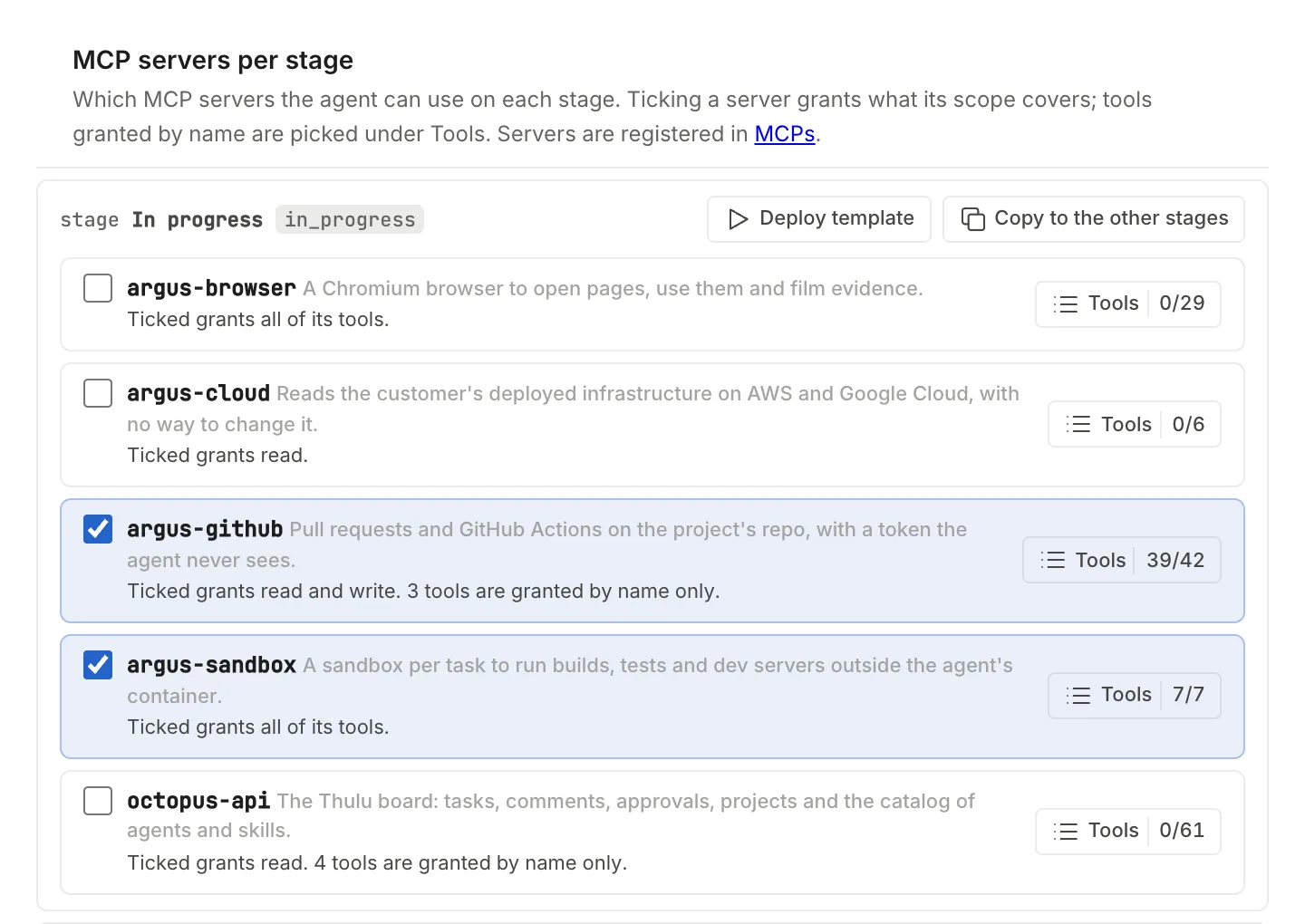
argus-sandbox ticked on the In progress stage. You have to repeat it on every stage where the agent has to build or bring up the app. -
Click “Save settings”.
With argus-sandbox, the run also receives the octopus-sandbox system skill, which teaches the agent to bring the project up, what to do when a build runs out of memory and how to leave the app ready for the next stage. See Agents and MCPs.
What the agent can do with the sandbox:
| Tool | What it is for |
|---|---|
exec |
Run a shell command. It returns the output, the errors and the exit code. Each command has a 30-minute limit. |
preview_url |
Ask for the address of a port where the app listens: one for the QA browser and another for a person (see Ports and previews). |
attach_file |
Attach to the task a file it generated in the sandbox (a PDF, a coverage report), up to 50 MB. |
init_status, init_run, init_script_get, init_script_update |
Check, run and fix the project’s init script (see Init script). |
See what is running
Section titled “See what is running”The page is in Settings mode: click “Settings” at the bottom of the sidebar and then “Sandboxes”, in the “Operations” group.
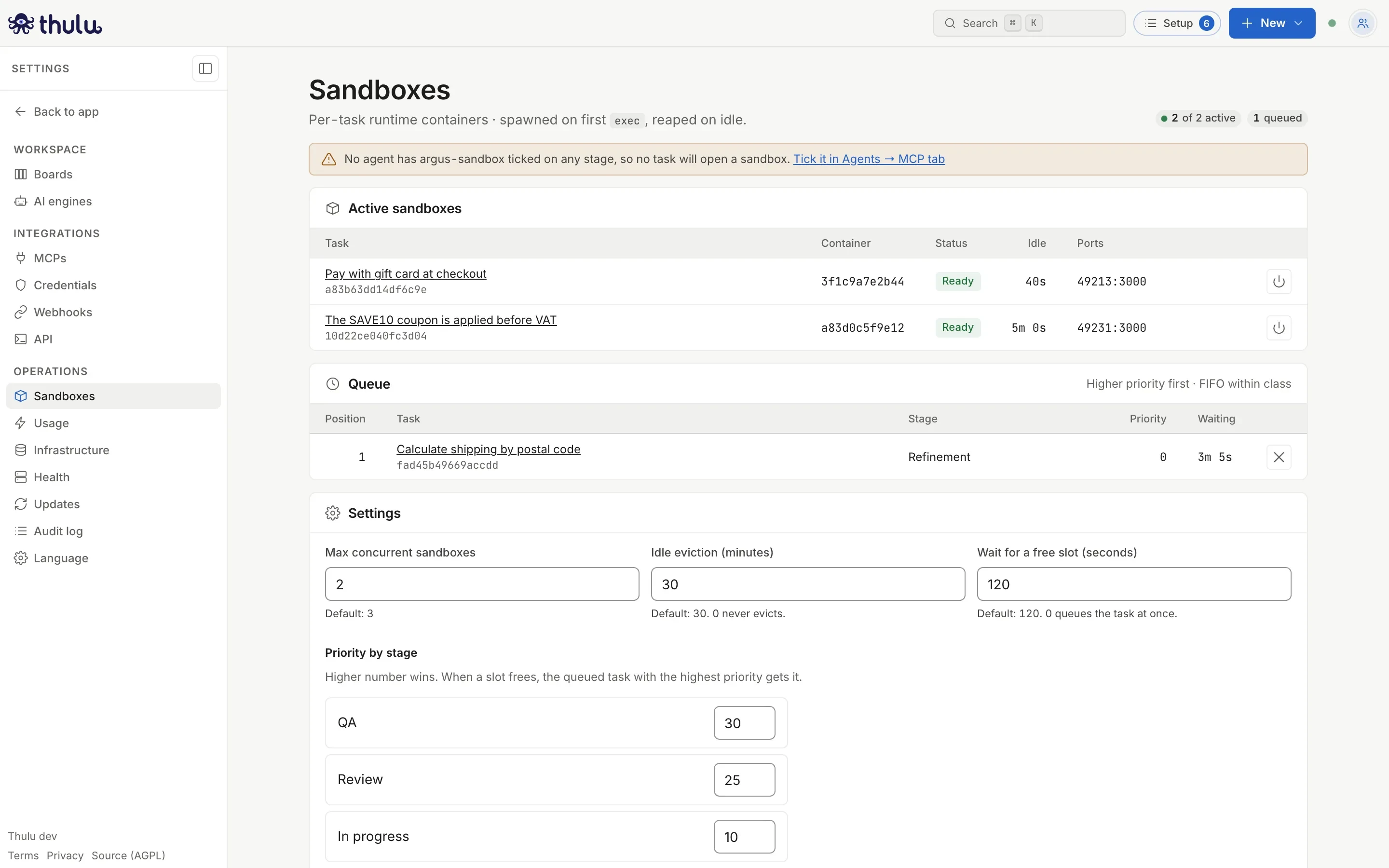
“Active sandboxes” lists one sandbox per task:
| Column | What it shows |
|---|---|
| “Task” | The task’s title, linking to its detail. “Prewarm of <project>” (a project’s cache prewarm) and “Evidence batch” (the app of an Evidence batch) also appear: they take a slot just like a task. |
| “Container” | The first 12 characters of the container (on Kubernetes, the pod). |
| “Status” | “Ready” (accepts commands) or “Starting”. Evicted and failed ones leave the list. |
| “Idle” | How long since it last received a command. When it reaches the idle eviction time, Thulu shuts it down. |
| “Ports” | Pairs host-port:sandbox-port. On Docker, 32800:3000 means the app listening on the sandbox’s 3000 opens at the server’s localhost:32800. |
The page refreshes itself every 4 seconds. Each person sees only the sandboxes of their workspace.
“Queue” lists the tasks that asked for a sandbox when all of them were already busy, with their stage and that stage’s priority. When a slot frees up, the highest priority takes it, and among equals the one that arrived first. Thulu relaunches the stage the task is in so the agent picks up again. “Take out of the line”, at the end of the row, removes a task that no longer has to wait.
Kill a sandbox
Section titled “Kill a sandbox”Use it when a sandbox ended up in a bad state (a hung process, a full disk) or to free a slot right now.
-
In “Active sandboxes”, click the power button at the end of the row. You can also do it from the task: the “Sandbox” row in its properties shows the status, how long it has been idle and “Kill”.
-
Confirm with “Kill”. The notice “Sandbox killed” appears.
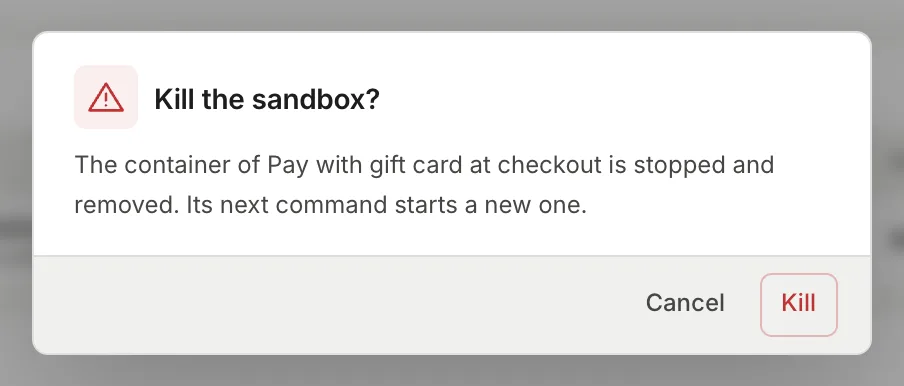
The dialog names the task that owns the sandbox.
Killing the sandbox doesn’t touch the task or its stage. If the agent sends another command, Thulu creates a new one for it: running processes, /tmp and anything installed outside the repo are lost, while the repo’s code and the workspace’s dependency cache are kept. It requires the admin role.
Change the limits and priorities
Section titled “Change the limits and priorities”The “Settings” panel has three numbers and one priority per stage. They apply to the whole install, not per workspace: only admins of the operator workspace can save them. Everyone else sees the panel read-only with the notice “Sandbox limits and stage priorities apply to every workspace on this install.”
| Field | Default | What it does |
|---|---|---|
| “Max concurrent sandboxes” | 3 | How many sandboxes can be alive at once. The next one requested waits in the queue. |
| “Idle eviction (minutes)” | 30 | How long without commands before a sandbox is shut down. One that is running a command isn’t shut down. If all slots are busy and someone asks for one, Thulu also evicts on the spot the one that has gone longest past that time without use. With 0 it never evicts. |
| “Wait for a free slot (seconds)” | 120 | How long the agent’s request waits for a slot to free up. After that time, the agent is told it was queued and Thulu relaunches the stage when its turn comes. With 0 the task goes to the queue right away. |
| “Priority by stage” | Stages that are neither start nor finish get 10, 20, 30… following their order on the board, including ones you create later; start and finish get 0. On the factory board: Backlog 0, In progress 10, Done 0 | The highest number wins when a slot frees up. Priority goes by stage id: two boards with a stage of the same id share the number. |
-
Change the values. For QA to go ahead of Development when there is no room, give its stage a higher number.
-
Click “Save settings”. “Saved” appears next to it. If a field is empty or isn’t a valid number, it is marked with the reason and nothing is saved: the values are saved all together or not at all. Tasks that were already in the queue are reordered with the new priorities.
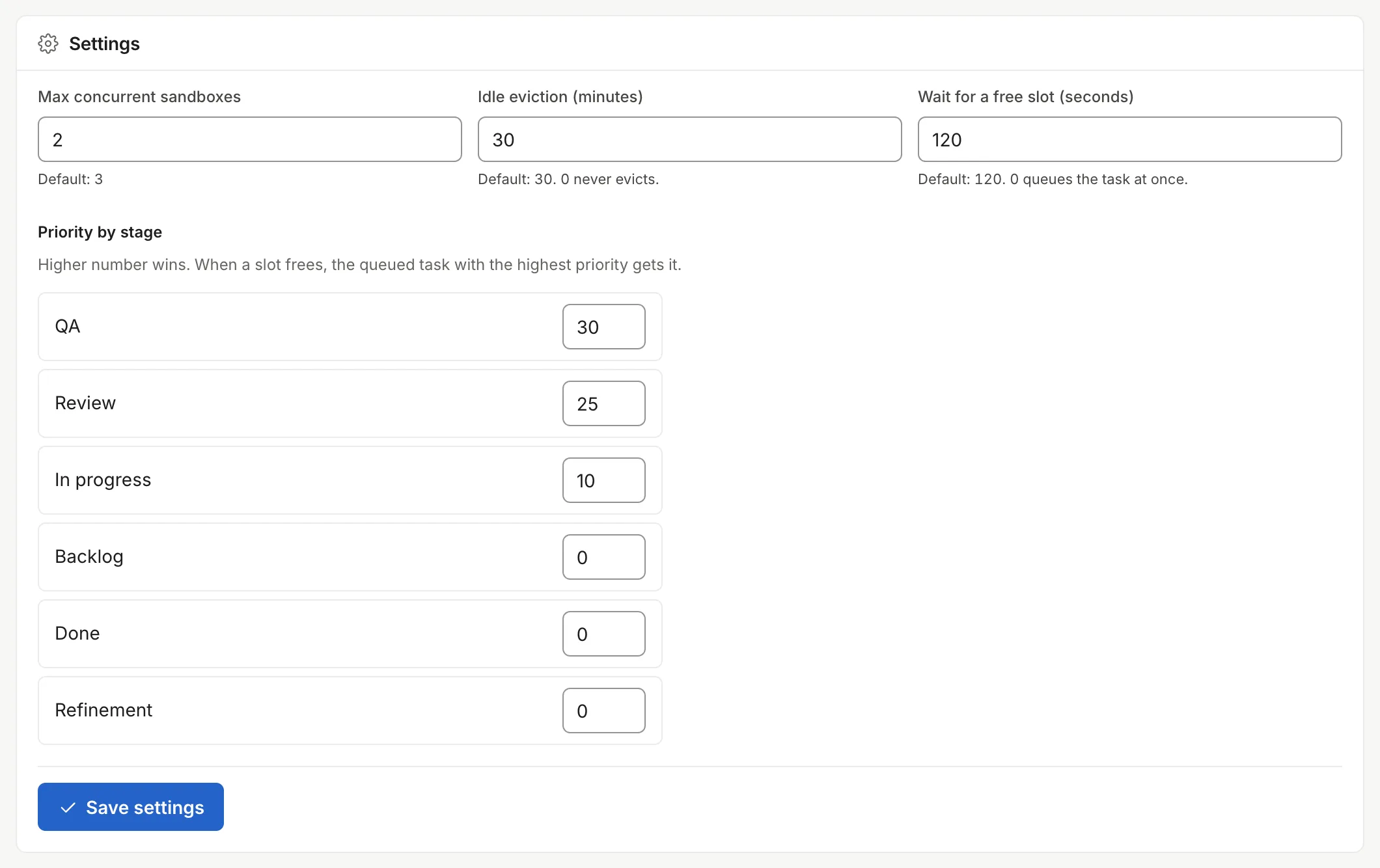
QA and Review take priority over In progress.
You can also reach this panel from the board: in a column’s menu, “Behavior” has the “Sandbox priority” link. The “Capacity” panel in Infrastructure shows how many sandboxes are running against the maximum, with the link “See which sandboxes hold a slot, and the queue”.
Ports and previews
Section titled “Ports and previews”The sandbox exposes four ports for the app: 3000, 5173, 8000 and 8080. The operator can change the list with OCTOPUS_SANDBOX_PORTS (for example 3000,4200,8080); a sandbox keeps the list it was created with. If the agent asks for the address of another port, preview_url answers with which ones exist and the agent has to move the app to one of those from the init script.
preview_url returns two addresses. The first is for the QA agent’s browser (argus-browser), which runs in another container. The second is for a person, and depends on the runtime:
The address for people is http://<host>:<host-port>, with the port shown in the “Ports” column and the host from OCTOPUS_PUBLIC_HOST (localhost if it isn’t set). By default Thulu publishes those ports only on 127.0.0.1 of the server where the daemon runs: if Thulu is on your machine, you open it directly; if it is on a server, the address with the public domain doesn’t respond and you need an SSH tunnel (ssh -L 32800:localhost:32800 server) to open http://localhost:32800. The operator can publish them on another interface with OCTOPUS_SANDBOX_PUBLISH_IP (0.0.0.0 opens them on all).
There is no address for people. The app’s ports stay on an internal Service of the cluster that only the pods of the same task reach (the QA browser included). To see the app, the agent has to describe on the task how to bring it up, or attach screenshots and videos with the evidence.
On Docker, the task’s “Sandbox” row shows a “Port N” link for each published port. On Kubernetes there is no link: you find out if the agent describes the app in a comment or attaches screenshots.
Init script
Section titled “Init script”Each project can save a script that brings the app up in the sandbox: the bash script, the ports, a “Ready command” (for example curl -fsS http://localhost:3000/) with its timeout, params, and a “Setup” phase that installs dependencies. You edit it on the project’s page, in the “Init script” panel, with revision history.
The agent runs it with init_run instead of guessing how the project comes up. If there is no script, the agent figures out how to bring it up, and when it works it saves it as a new revision, which is recorded in the history and in the audit log with the agent as author. The same goes if the script breaks on an incompatibility. Each workspace also has a persistent cache at /cache (npm, Go, pip and the versions mise installs) that survives evictions.
The details are in Projects.
Runtimes: Docker and Kubernetes
Section titled “Runtimes: Docker and Kubernetes”Whoever installs Thulu chooses where agents and sandboxes run. You can’t see or change it from the UI: it is daemon configuration (environment variables on Docker, Helm chart values on Kubernetes). See Self-hosted operations.
- One container per sandbox on the same host, with Linux capabilities dropped except eight basic ones (
CHOWN,SETUID,KILLand similar),no-new-privileges, 6 GB of memory (swap included), 2 CPUs and a cap of 4096 processes (OCTOPUS_SANDBOX_CPUS,OCTOPUS_SANDBOX_PIDS_LIMIT). - It runs as root inside the container, so the agent can install packages with
apt-get. WithOCTOPUS_ROOTLESS_AGENTS=trueit runs as uid 1000, without capabilities. - It runs on the install’s own network,
octopus-agents, and publishes its ports on127.0.0.1. - No Docker inside: a
docker-compose updoesn’t work; the services the app needs run as processes. - No outbound internet filter: the sandbox and the agents can connect to any host the machine reaches, including your internal network. The additional Docker hardening is postponed.
- The Kubernetes runtime requires a license with the
kubernetesfeature; without it the daemon doesn’t start with that runtime. - One pod per sandbox in the workspace’s namespace, with Pod Security
restricted, a resource quota and per-container limits. It runs as uid 1000, without root orapt: replace a system package with one installed through mise, npm or pip. - A RuntimeClass is mandatory (
OCTOPUS_RUNTIME_CLASS, Kata Containers by default in the chart; gVisor too): each sandbox runs in its own microVM or isolated kernel. The daemon doesn’t start without one, and an admission policy rejects pods without a RuntimeClass or privileged ones. - Outbound internet controlled by
OCTOPUS_TENANT_EGRESS_MODE:open(default): DNS, the daemon and HTTPS (443) to public addresses. Private ranges, cloud metadata and node IPs are left out.proxy-only: DNS, the daemon and only the destinations inOCTOPUS_TENANT_EGRESS_ALLOW_CIDRS(your proxy, GitHub Enterprise, the internal registry).
- Practical consequence: a registry on another port, a database on the internal network or a service over SSH don’t respond from the sandbox. Package managers have to use HTTPS mirrors.
- Validated on a single-node k3s cluster with Kata; it has never run on a multi-node cluster.
On both runtimes Thulu passes HTTP_PROXY, HTTPS_PROXY and NO_PROXY to the sandbox, and OCTOPUS_EXTRA_CA_BUNDLE adds your company’s certificate authority. For untrusted code, the strong boundary is Kubernetes with Kata.
When to step in
Section titled “When to step in”Day to day, sandboxes are created and shut down on their own. These are the cases where it is worth looking at the page:
-
A task doesn’t start and shows in “Queue”: all slots are busy. Wait for a sandbox to be evicted, kill one that is no longer needed or raise the maximum.
-
There is a free slot and the task is still in “Queue”: Thulu tried to relaunch the stage the task is in now and couldn’t, for example because the task moved to a column where it has no agent assigned. Move the task to a column with an agent so it runs again, or click “Take out of the line” if it no longer has to wait. If the workspace’s plan limits how many agents run at once, the other cause is that the workspace reached that cap even though the install has room.
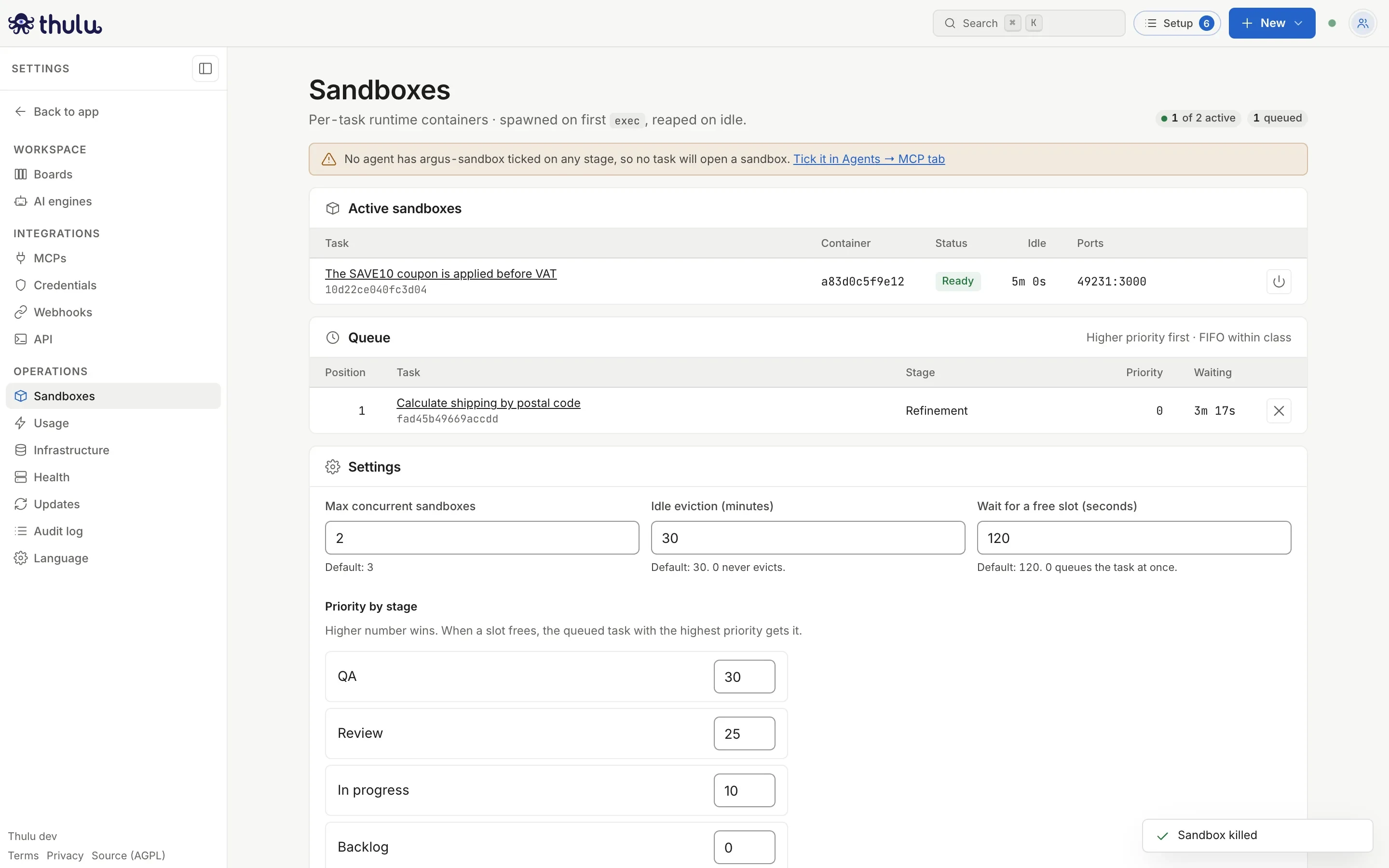
After killing a sandbox there is a free slot, but the queued task is still there because it was in a column without an agent. Taking it out of the line frees it. -
The agent reports that a command ended with code 137: the process went past the sandbox’s 6 GB of memory. The
octopus-sandboxskill tells it to lower the build’s parallelism before reporting it. If the whole sandbox stopped responding, kill it. -
The agent says the sandbox is down or the command “timed out” at the second: the container died. Kill it so the next request creates a new one.
-
The app doesn’t open in your browser: on Docker, check that you are on the server or have a tunnel to the host port; on Kubernetes there is no direct access.
-
The agent doesn’t have the sandbox tools:
argus-sandboxisn’t ticked on the agent’s stage.