

Automations
An automation is a short YAML recipe: a trigger and a list of steps that run in order. The trigger can be a schedule (cron), a GitHub or board event, a metric that crosses a threshold, or the “Run now” button. The steps gather cheap data (a board query, a metric, a script, an HTTP call or an MCP call) and, if needed, open a task, comment on an existing one or wake an agent. A nightly check that finds nothing spends no tokens.
Anything that needs several turns or a person’s judgment goes to the board as a task. Recipes have no branches or loops beyond condition, when and fanout, and a whole run is cut off after 10 minutes (configurable up to an hour).
Automations live under “Automations” in the sidebar and belong to the workspace: you cannot see them from another workspace. Admins create, edit, run and delete recipes; developers can read them and see their runs.
Recommended flow: a fixed task every Monday
Section titled “Recommended flow: a fixed task every Monday”The example opens a task every Monday at 9 to review dependencies. If last Monday’s is still open, it comments on it instead of opening another. You need the admin role in the workspace; with the developer role the save and run buttons return an error.
-
Open “Automations” and click “New automation”. Pick a template: “Blank” is enough for this example. Templates with a schedule take your browser’s time zone.
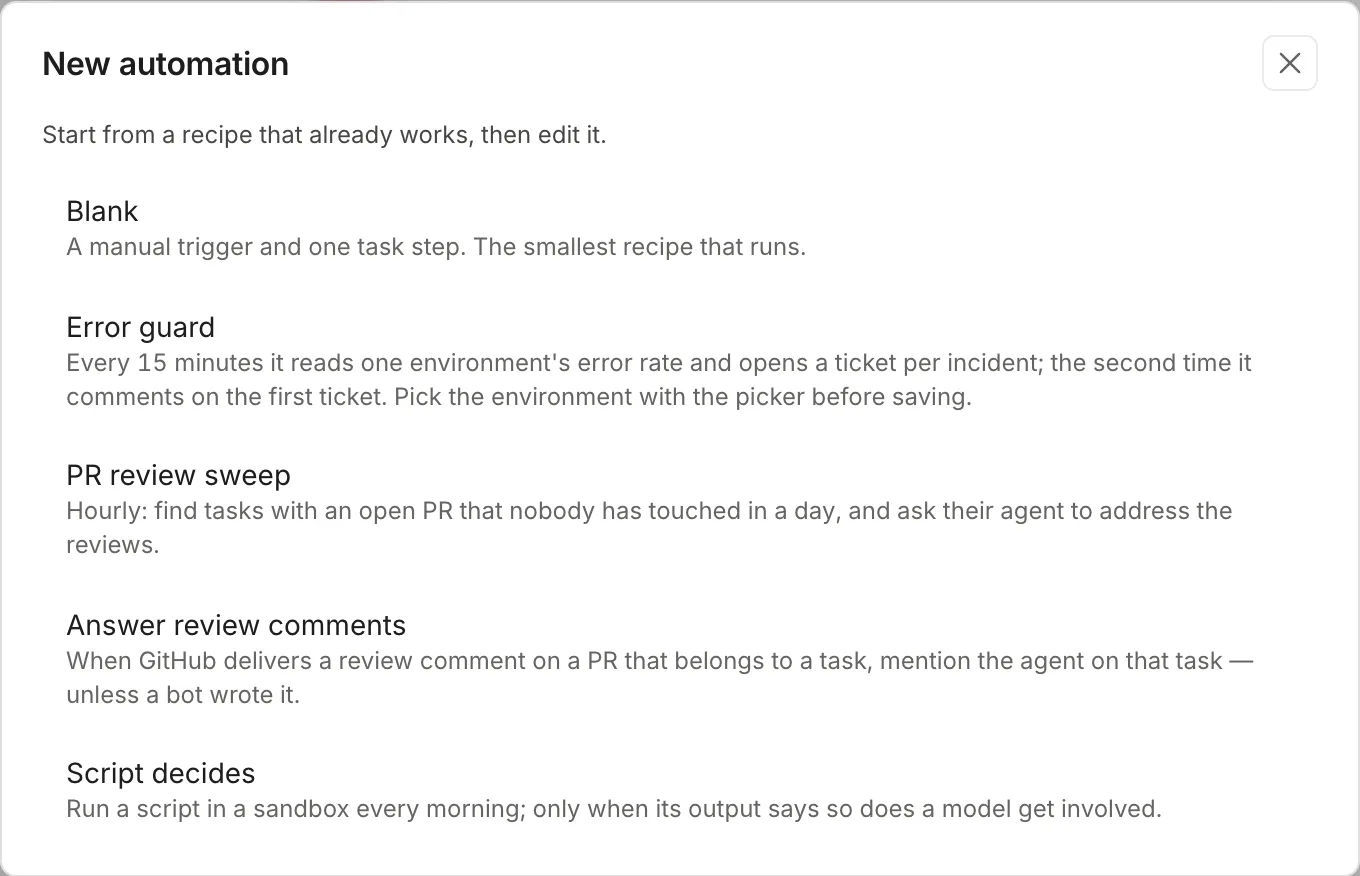
Each template is a recipe that already passes validation. -
The template opens in the editor with the “unsaved” badge. “Run now”, “Disable” and the trash can stay disabled until you save. Above the YAML, the “Trigger” form picks the kind (Schedule, Event, Metric, Manual) and its fields, and “Insert the ID of:” has board, stage, agent, project and environment pickers that write the ID at the cursor. If the YAML cannot be read, the form locks with “Fix the YAML below to use the form again.” For this example, replace the YAML with the recipe:
name: dependencies mondaydescription: one task a week to review outdated dependenciestrigger:schedule: "0 9 * * 1"tz: America/Argentina/Buenos_Airespolicy:concurrency: forbidmax_agent_runs_per_day: 2timeout: 5msteps:- id: tickettask:title: "Review outdated dependencies"body: |List the dependencies with new versions or security advisoriesand open a PR with the ones that can be updated without breaking anything.tags: [dependencies]priority: mediumfingerprint: "weekly-dependencies"on_duplicate: commentThe name at the top of the editor and the
name:line are the same data: changing one changes the other. -
Click “Validate”. If the recipe is fine, the name, the trigger kind and the next five runs in your local time appear below in green: this is how you check that the cron says what you meant.
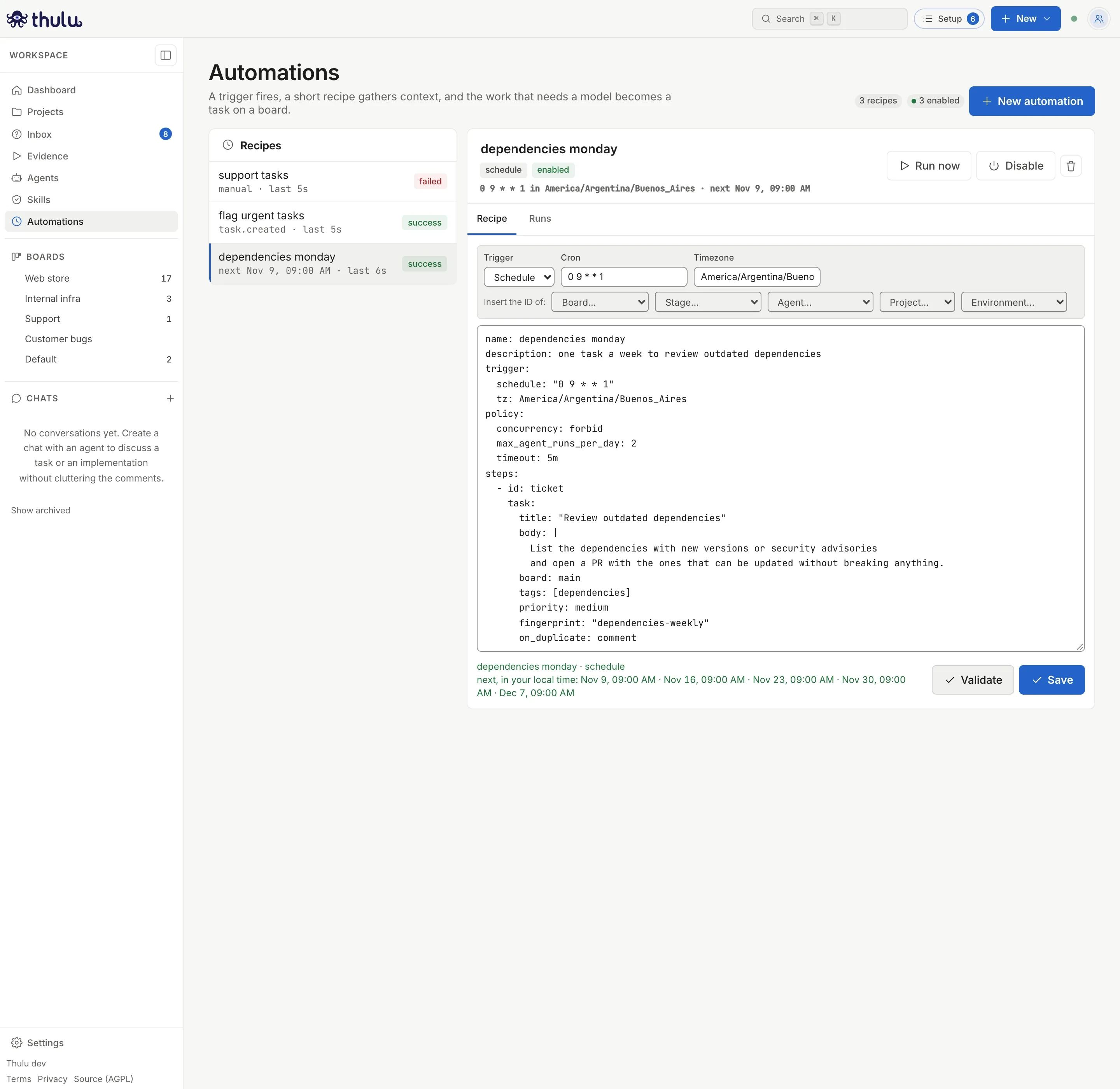
Validate saves nothing: it shows the next runs in your local time. If something is wrong, the same place shows the first error in red. A misspelled key, an event that does not exist, a
fanoutwithoutmax_itemsor a board, stage, agent, project or environment that does not exist in the workspace are rejected before saving.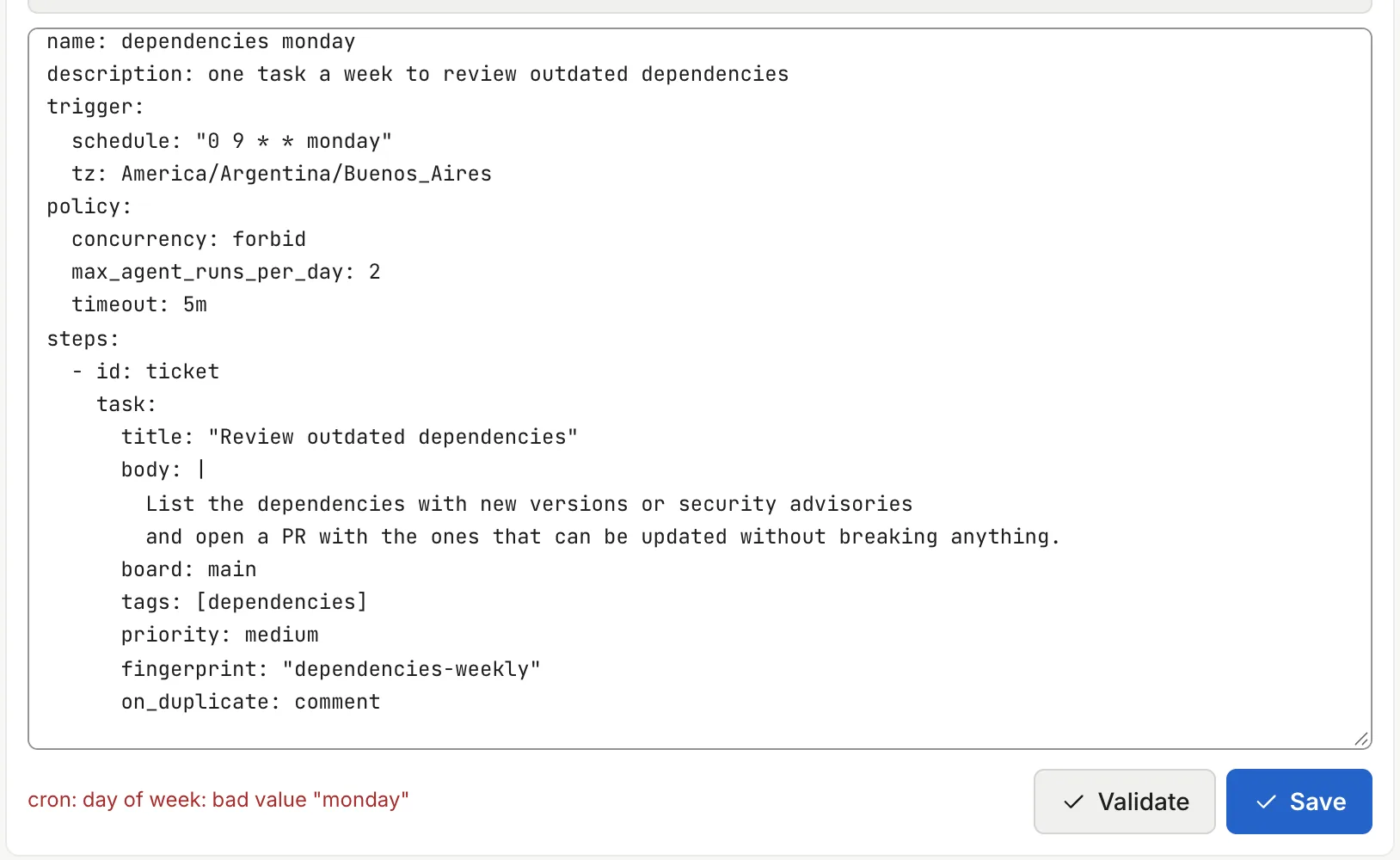
The cron accepts short names (mon, tue) or numbers, not full day names. -
Click “Save”. The notice “Saved” appears, the recipe enters the list as “enabled” and the header shows the cron, the zone and the next run in your local time.
-
Try it with “Run now”. The “Runs” tab opens with the run expanded: each step with its status and a summary (“Created the task “Review outdated dependencies””, with a link to the task). Run it again and you will see that the second run does not open another task: it finds the fingerprint and comments on the open task (“The task … already existed, so it commented on it”).
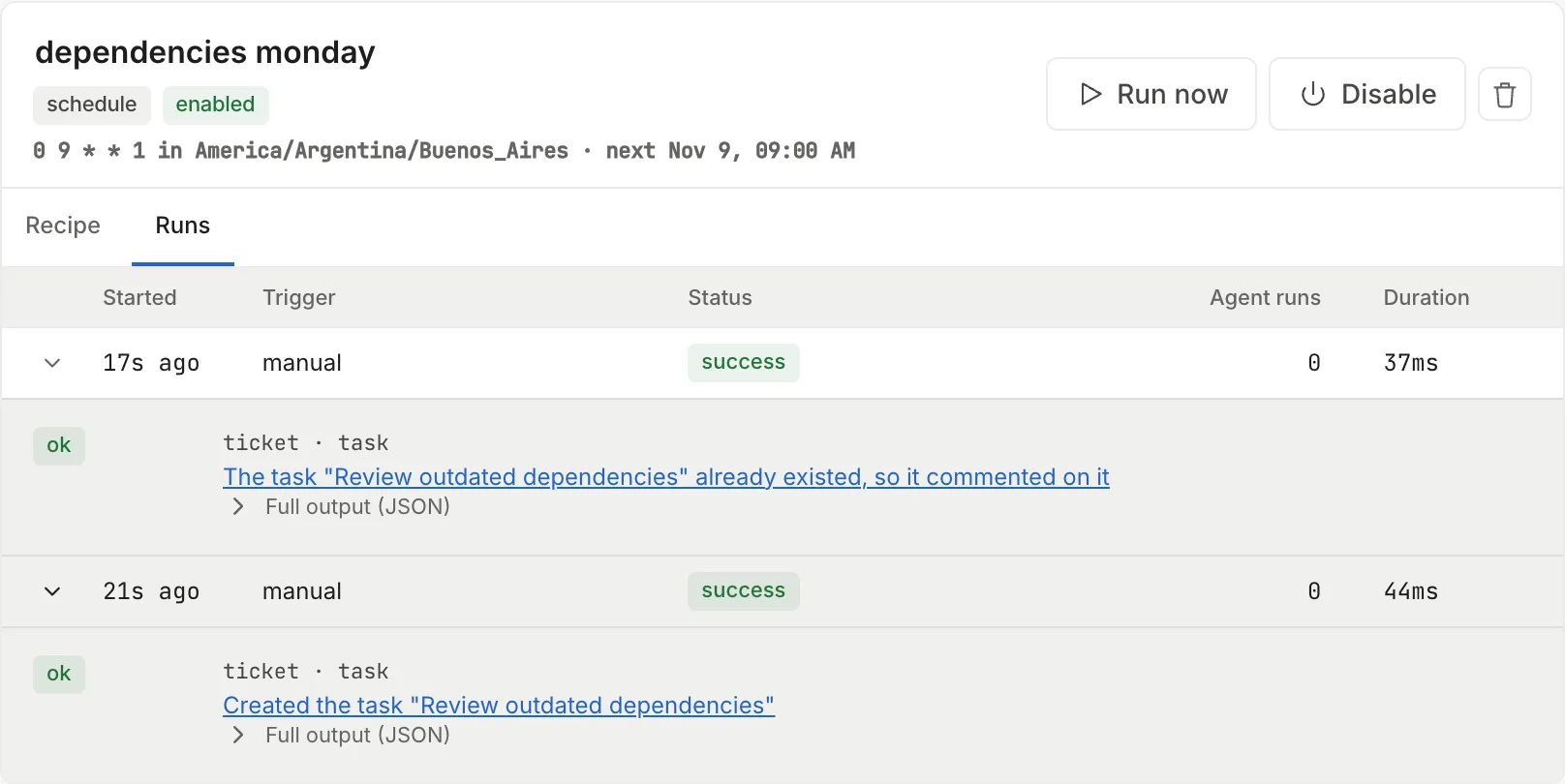
At the bottom the first run, which created the task; above it the second, which commented on the same one.
The created task appears on the workspace’s default board, in its first stage (Backlog), with the tag dependencies, and stays there until someone moves it. For an agent to start on its own, add stage: with the ID of a stage that has an agent (for example in_progress) and, if the stage does not carry a default one, stage_assignments: { in_progress: <agent name> }. The task enters that stage as if you had dragged it.
Read the runs
Section titled “Read the runs”Each row under “Runs” shows when it started, what triggered it (“manual”, “schedule”, “event”, “metric”, “test data”), the status, how many agents it woke and how long it took. Click the row to see the steps: each with a plain-language summary and, expandable, “Full output (JSON)”. “Trigger data (trigger.payload)” shows what the recipe received. While a run is in progress, the row has a “Cancel” button. The list refreshes by itself every 5 seconds.
| Status | What happened |
|---|---|
| “running” | It is running. |
| “success” | It finished. A step with continue_on_error may have failed. |
| “failed” | A step failed and the recipe did not say continue_on_error. The error appears in red above the steps. |
| “timed out” | policy.timeout passed and it was cut off. |
| “skipped” | Something stopped it, with the reason next to it: a false condition (not a failure: the guard said there was nothing to do), another run in progress (concurrency: forbid), it came in late, the daily agent cap was spent, a filter that could not be evaluated, or a chain of recipes that was too long. |
| “canceled” | You canceled it by hand or another run replaced it (concurrency: replace). |
“Agent runs” counts only the steps that woke an agent: a task entering a stage with an agent, or a mention that wakes one. A task landing in Backlog or a comment by fingerprint counts 0.
Other tasks
Section titled “Other tasks”React to a board event
Section titled “React to a board event”There are three board events:
| Event | Fires when |
|---|---|
task.created |
A task is created: by a person, a subtask or an automation (not when cloning a task). |
task.stage_changed |
The task enters a new stage: a person moves it, it advances by itself when the agent finishes, an approval releases it or it goes back. It does not fire when deleting a stage moves its tasks. |
task.failed |
An agent’s run on the task fails. |
The event reaches the recipe in trigger.payload with task_id, title, stage, board_id, status and tags; task.stage_changed adds from and to, a subtask carries parent_id and a task from a recipe carries source: automation. With filter you choose which events fire it. A recipe is never fired by a task it opened itself, and a chain of three recipes that fire each other does not fire a fourth.
This recipe comments on each new task that arrives with the tag urgent:
name: flag urgent tasksdescription: comments on each new task marked as urgenttrigger: event: task.created filter: '"urgent" in trigger.payload.tags'steps: - id: notice mention: task_id: "{{ trigger.payload.task_id }}" body: "It came in as urgent. Review it at tomorrow's daily."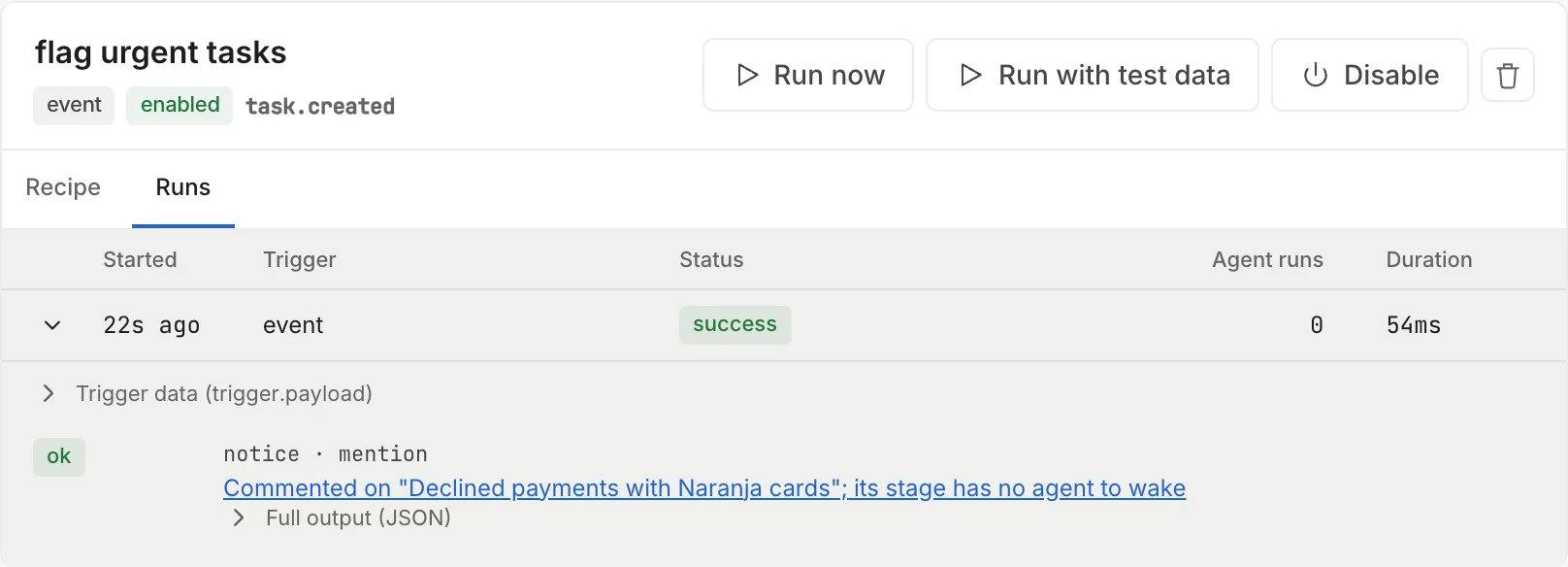
The comment appears in the task’s activity signed by “An automation”:
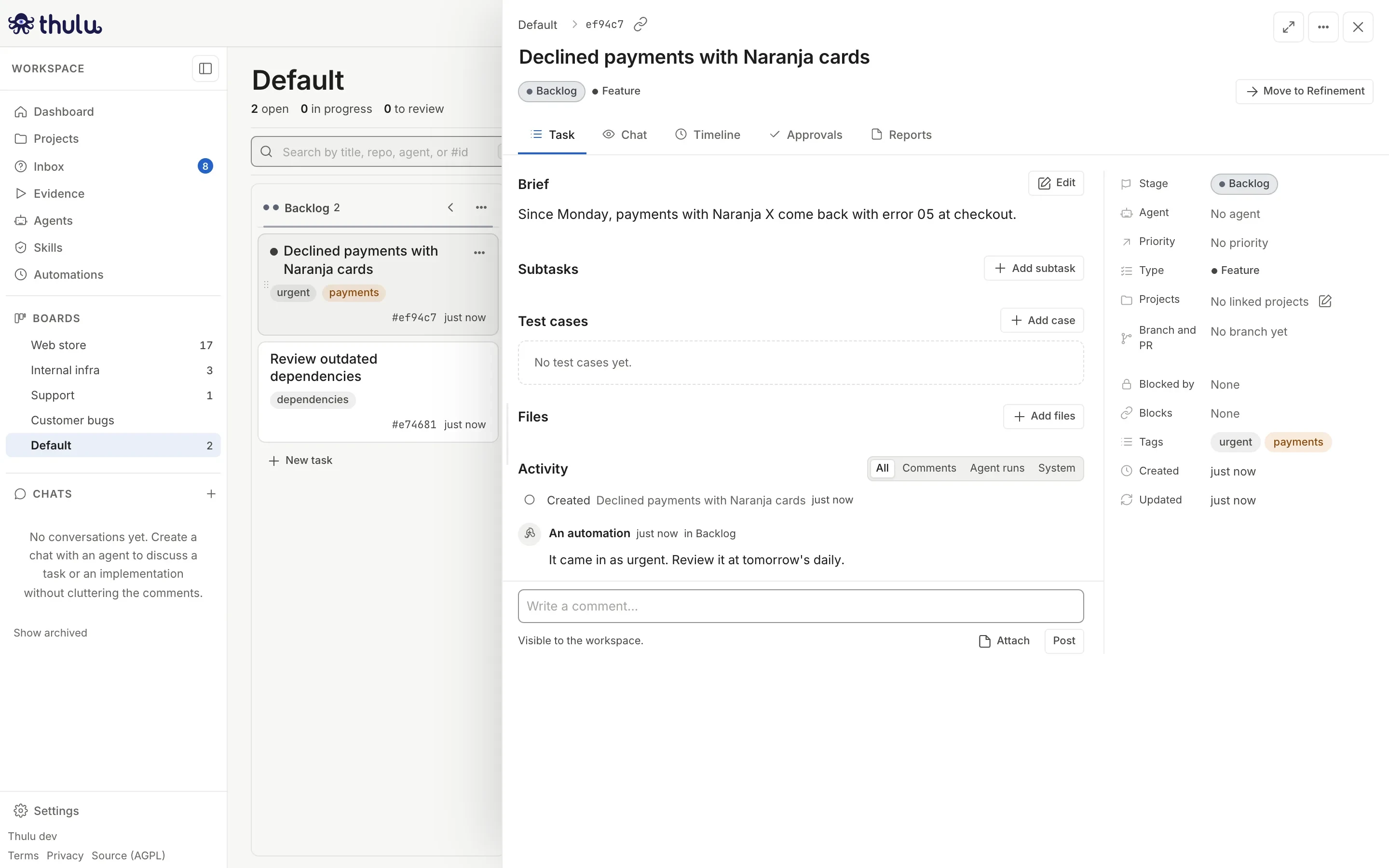
A mention step without agent: wakes the agent assigned to the task’s current stage. If the stage has no agent (Backlog, an end stage), it only comments, and the summary says so: “Commented on “…”; its stage has no agent to wake”. With agent: it wakes that agent. The automation goes through the same path as a person’s mention, with the same per-thread caps. See Comments and threads.
To test an event or metric recipe without causing the event, use “Run with test data”: it opens a sample payload shaped like the real one, editable, and the recipe runs with it as trigger.payload. Change task_id to the ID of a task that exists. “Run now” runs with an empty payload.
If the filter cannot be evaluated (a misspelled function, a field of the wrong type), the run ends “skipped” with the error, so a broken recipe shows in the history. Validate also rejects a filter that reads a field the event does not carry.
Answer review comments on GitHub
Section titled “Answer review comments on GitHub”The six GitHub events (github.pull_request_review_comment, github.pull_request_review, github.issue_comment, github.pull_request, github.push, github.check_suite) arrive through the GitHub App’s webhook. First the workspace has to have the App installed and claimed: see Git and GitHub. On a self-hosted install with a single workspace, an unclaimed installation still delivers its events; with several workspaces, or on the SaaS, they are discarded until someone claims it.
The “Answer review comments” template covers the most common case: when a person leaves a review comment on a PR that belongs to a task, it mentions the agent of that task’s current stage with the comment’s text.
- Under “New automation”, pick “Answer review comments”.
- If you want a fixed agent to handle it and not the stage’s, add
agent:to thereplystep with its name (the same one you would mention with@on the task). - Click “Validate” and then “Save”.
- Try it with “Run with test data”, with the ID of a task that has a PR.
The filter discards bot comments (sender_is_bot), which is what keeps an agent from answering itself forever, and requires task_id: a PR that did not come from a Thulu task fires nothing. The “PR review sweep” template does the same every hour for the tasks that have an open PR with no activity in a day.
With policy.debounce, a burst is gathered into a single run: the first event of a PR opens the window, the ones that arrive inside it wait, and when it closes the recipe runs once. trigger.payload is the last event and trigger.payload.events carries all of them (up to 50); the run shows “Gathered 5 events”. The window does not stretch while more keep arriving.
The GitHub payload carries, among others, repo, pr_url, pr_number, pr_title, branch, comment, comment_by, sender_is_bot and review_state. If the PR belongs to a Thulu task, it also carries task_id, task_title and task_stage.
Fire on a metric
Section titled “Fire on a metric”A metric trigger checks an environment’s metric every 5 minutes (configurable with every, minimum 1m) and fires when it crosses the threshold. After that it does not fire again until the value returns to the other side of the threshold, so an incident that lasts an hour opens a single run. If the window has no data, it does nothing.
name: checkout latencytrigger: metric: environment: e1f0c2a9b7d34c58 # environment ID, not its name metric: latency_p95 window: 15m agg: avg # avg, max, min, sum or last op: ">" # >, >=, < or <= threshold: 800policy: max_agent_runs_per_day: 4steps: - id: ticket task: title: "Slow checkout: p95 at {{ trigger.payload.value }} ms" priority: high fingerprint: "checkout-latency" on_duplicate: commentenvironment takes the environment’s ID, not its name: pick it with the “Environment…” picker above the editor, which writes it for you. Save rejects an ID that does not exist in the workspace (“no environment … in this workspace”). The “Error guard” template asks for it with a comment in the YAML.
The metric can be one of the environment’s fixed signals (latency_p50, latency_p95, error_rate, throughput, cpu, memory, restarts, cost_daily, saturation) or a custom metric registered on that environment. See Metrics and dashboards.
Diagnose a failed run
Section titled “Diagnose a failed run”Open “Runs”, expand the red row and read the step’s error. Fix the recipe under “Recipe”, save and try with “Run now” or “Run with test data”. The list on the left shows the status of each recipe’s last run, so a broken recipe is visible without opening it.
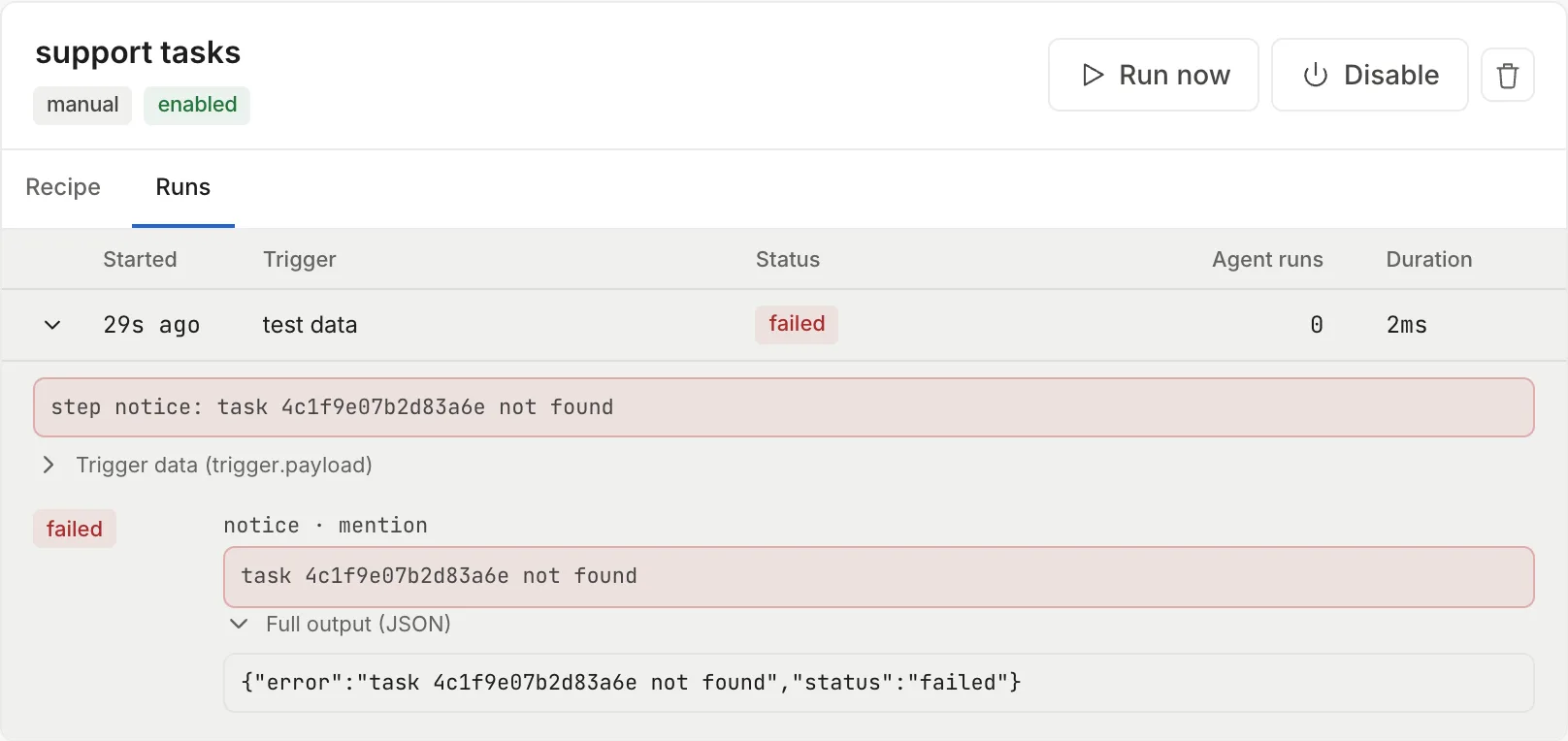
What you can only know at run time also shows up here: a {{ }} that gives a task that does not exist, as in the capture, a script that does not finish, an MCP that does not respond. In a task step, board and stage do not take {{ }}, because the text would arrive as written: Save rejects it with “board does not take {{ }} templates”.
Pause or delete a recipe
Section titled “Pause or delete a recipe”“Disable” suspends the recipe: it does not run on schedule, event or metric, the header says “suspended” and the next run disappears. “Run now” keeps working. “Enable” turns it back on.
The trash can (“Delete automation”) deletes the recipe and its whole run history after you confirm. It cannot be undone; if in doubt, disable it.
If you have unsaved changes in the editor and pick another recipe from the list, Thulu asks you to confirm: “Your edits to this recipe will be lost.”
The recipe inside
Section titled “The recipe inside”Triggers
Section titled “Triggers”Each recipe has exactly one.
| Trigger | Fields | When it runs |
|---|---|---|
| Schedule | schedule (5-field cron or @hourly, @daily, @weekly, @monthly), tz |
At each cron time. |
| Event | event, filter (optional) |
When an event from the catalog arrives that meets the filter. |
| Metric | metric with environment, metric, window, agg, op, threshold, every |
When the metric crosses the threshold. |
| Manual | manual: true |
Only with “Run now”. The other three can also be run by hand. |
Each step has an id (lowercase, digits and _, up to 32 characters) and a single action. What it returns is available to the following steps as steps.<id>.<field>. Any step accepts when: (skipped if false) and continue_on_error: true (if it fails, the run continues).
| Step | What it does | What it returns |
|---|---|---|
query |
Reads tasks (filters board, stage, tag, project_id, with_pr, open, stale_for, limit) or a metric (environment, metric, window, agg). With open: true it leaves out tasks in end stages. |
count and json.tasks, or value and has_data. |
condition |
Stops the run if the expression is false. The run ends “skipped” with the reason. | — |
task |
Opens a task (title, body, board, stage, stage_assignments, type, tags, priority, project_ids). priority accepts urgent, high, medium or low; type is the ID of a board task type. With fingerprint, it deduplicates. |
task_id, created, duplicate. |
mention |
Comments on an existing task and wakes agent, or the agent of its current stage if it does not name one. |
task_id. |
script |
Runs a command in an empty sandbox with node, python3, git, curl and jq. Up to 10 minutes (2 by default). An exit code other than 0 does not fail the step. | stdout, stderr, exit_code, and json if the output is JSON. |
http |
Calls a URL, with a secret from the credential manager in credential. Up to 30 seconds. |
status_code, text, json. |
mcp |
Calls a tool of a connected MCP. For now it only reaches SSE servers without their own credential: one registered with Streamable HTTP or with a stored credential is rejected with an error that names it. | Whatever the tool returns. |
fanout |
Repeats its child steps for each item of a list. max_items is required, up to 50. |
items, truncated. |
board and stage take identifiers, not labels: the default board is default and its stages are backlog, in_progress and done. The pickers above the editor write the ID for you. See Boards and stages.
Fingerprint: one task per problem
Section titled “Fingerprint: one task per problem”Without fingerprint, a recipe that runs every hour and finds the same problem opens 24 tasks a day. With fingerprint, the first run opens the task and the following ones, while that task stays open, do whatever on_duplicate says:
on_duplicate |
What it does |
|---|---|
comment (default) |
Comments on the open task with the new title and body. |
skip |
Does nothing. |
create |
Opens another identical task. |
When the task reaches a terminal stage, the next run opens a new one. The fingerprint is a template: "deps-{{ trigger.fired_date }}" gives one task per day; a fixed text gives one task per problem, however long it lasts.
Policy
Section titled “Policy”| Field | Default | What it controls |
|---|---|---|
concurrency |
forbid |
forbid does not start another run if one is in progress; replace cancels the previous one; allow lets them overlap. It also applies to “Run now”. |
timeout |
10m |
Cutoff of the whole run. Maximum 1h. |
max_agent_runs_per_day |
no cap | How many times it can wake an agent in 24 hours. When it is reached, the run ends “skipped” with the cap in the reason. |
debounce |
no debounce | Gathers the events of the same PR or the same task that arrive within the window into a single run when it closes. |
starting_deadline |
2m |
If the daemon was down, a run delayed by more than this is skipped instead of recovered. |
history_limit |
200 |
Runs kept per recipe. |
Expressions and templates
Section titled “Expressions and templates”condition, when and filter are expressions; text fields accept {{ … }} templates with the same language. You can read trigger.payload.*, trigger.fired_date (like 2026-10-19), steps.<id>.*, vars.* and, inside a fanout, the current item.
Operators: == != < <= > >=, && || !, + - * / %, in, parentheses and lists (["created", "edited"]). Functions: exists, size, len, contains, lower, upper, trim, default, int, string, matches, slice, join.
Validate checks that expressions are well written and that names exist: a steps.erros.value or an unknown function is an error at validation, not an empty value at 3 in the morning.
Common problems
Section titled “Common problems”| Symptom | Cause and way out |
|---|---|
| “Automations are not enabled on this install.” | The daemon does not have the automations store connected. This is an installation matter; see Self-hosted operations. |
| Save fails with “line 2: the key “triger” does not go here” | A misspelled or misindented key. The message names the line and the key. |
| Save fails with “unknown board …” or “board … has no stage …” | The recipe names a label instead of the ID. Use the pickers above the editor. |
| The scheduled recipe runs at a strange time | tz is missing, or the cron uses spelled-out day names. |
| The run ends “skipped” | Look at the reason: a false condition, another run in progress, max_agent_runs_per_day used up or a filter that failed. |
| An event recipe leaves no run | The filter returned false, or the same recipe opened the task. |
| The mention comments but the agent does nothing | The task’s current stage has no agent, or the agent does not answer mentions: the step’s summary says so. Name an agent with agent:. |
An mcp step fails with “speaks Streamable HTTP” or “authenticates with a workspace credential” |
Automation steps do not reach those servers yet. |