

Self-hosted install
Self-hosted Thulu is one binary (thulu) that installs and manages the rest: the daemon with the dashboard, Postgres and the MCP servers the agents use. The binary weighs about 22 MB and carries the deployment files inside, so there is nothing to clone; the daemon runs from the octopus image. thulu init is a terminal wizard that asks questions, writes the configuration, creates the first workspace with a CLI key and brings the stack up. The installer also leaves octopus as an alias of the same command.
If you would rather not install anything, see Get started on the SaaS version: today it is a closed beta by invitation.
Before you start
Section titled “Before you start”| You need | What for |
|---|---|
| Linux or macOS, amd64 or arm64 | The CLI is built for these. |
| Docker with Compose v2 (or a Kubernetes cluster with Helm) | Runs the daemon, Postgres and the MCPs. On macOS, Colima works. |
| Optional: an Anthropic API key and a GitHub token for the agents | Without the first, runs fail at dispatch. Without the second, agents can only read public repos. You can load them later. |
The images are published for linux/amd64 and linux/arm64, so a Mac with Apple Silicon runs them natively.
Recommended flow: one machine, no login
Section titled “Recommended flow: one machine, no login”This is the shortest way to see Thulu running on your computer. The dashboard is published only on 127.0.0.1:8585 and you get in with a link that carries a token.
-
Install the binary. The script detects your platform, downloads the release, verifies the checksum and, if you have
cosign, the signature:Terminal window curl -fsSL https://github.com/MisterDonnuts/thulu/releases/latest/download/install.sh | shIt puts the binary in a writable directory on your
PATH, never withsudo. If there is none, it uses~/.local/binand prints the line to add it to yourPATH.--version 0.3.4installs a specific release. If there is a terminal, it asks at the end “Configure it now? (thulu init)”. -
Run the wizard from any folder:
Terminal window thulu initIf you aren’t inside a checkout, it writes the deployment files to
~/.octopus(or toOCTOPUS_HOME). Before the first question it checks the machine: whether Docker answers, whether Compose v2 is there, the architecture, whether ports 8585 and 5433 are free and thekubectlcontext. The questions are forms: arrows to move, space to check and Enter to confirm. With-plainthey become text with numbered options. -
At “How do you want to install?” keep the default option, “Quick, on this machine”: Docker with the published image, no login and only on
127.0.0.1:8585. It asks three things and everything else takes its default:- Engines: check Claude Code and paste an Anthropic API key (it starts with
sk-ant-api). Enter skips it and you load it later in the dashboard. Amazon Bedrock and Google Vertex AI are configured later, in Settings → AI engines. - Runner: keep “No, agents run in containers” (see Other flows).
- GitHub: the token so agents can clone and push. You can skip it too.
- Engines: check Claude Code and paste an Anthropic API key (it starts with
-
Review the summary. It shows the installation, the access, the database, the MCP servers, the engines and what was skipped. Nothing is written before this point. Pick “Install”, “Show the deploy/.env changes and the command” (it shows the diff, with secrets trimmed, and asks again) or “Cancel”.
-
Wait for it to come up. The wizard pulls the image, detects the Docker socket’s group, starts Postgres, creates the workspace and the key, starts the rest of the stack and waits for the daemon to answer. The full log stays in
deploy/init.log. At the end it prints the dashboard link, the key and the next steps:Thulu is up.Dashboard http://localhost:8585/?token=…127.0.0.1 only, no logins: this link is the key. `thulu open` opens it again.Key for the CLI and the API. It is shown only this once, keep it:oct_…Use it with: export OCTOPUS_API_KEY=oct_6b77…The key expires on …Keep the key in a secrets manager: it is the one the CLI uses to talk to the daemon and it can’t be recovered. It expires after 90 days, unless you ran
thulu initwithOCTOPUS_API_KEY_MAX_TTL=0in the environment. For another one, runthulu keys mint. -
Open the dashboard with
thulu open, or by pasting the link from the previous step. The “Setup” button in the top bar shows how many things are missing.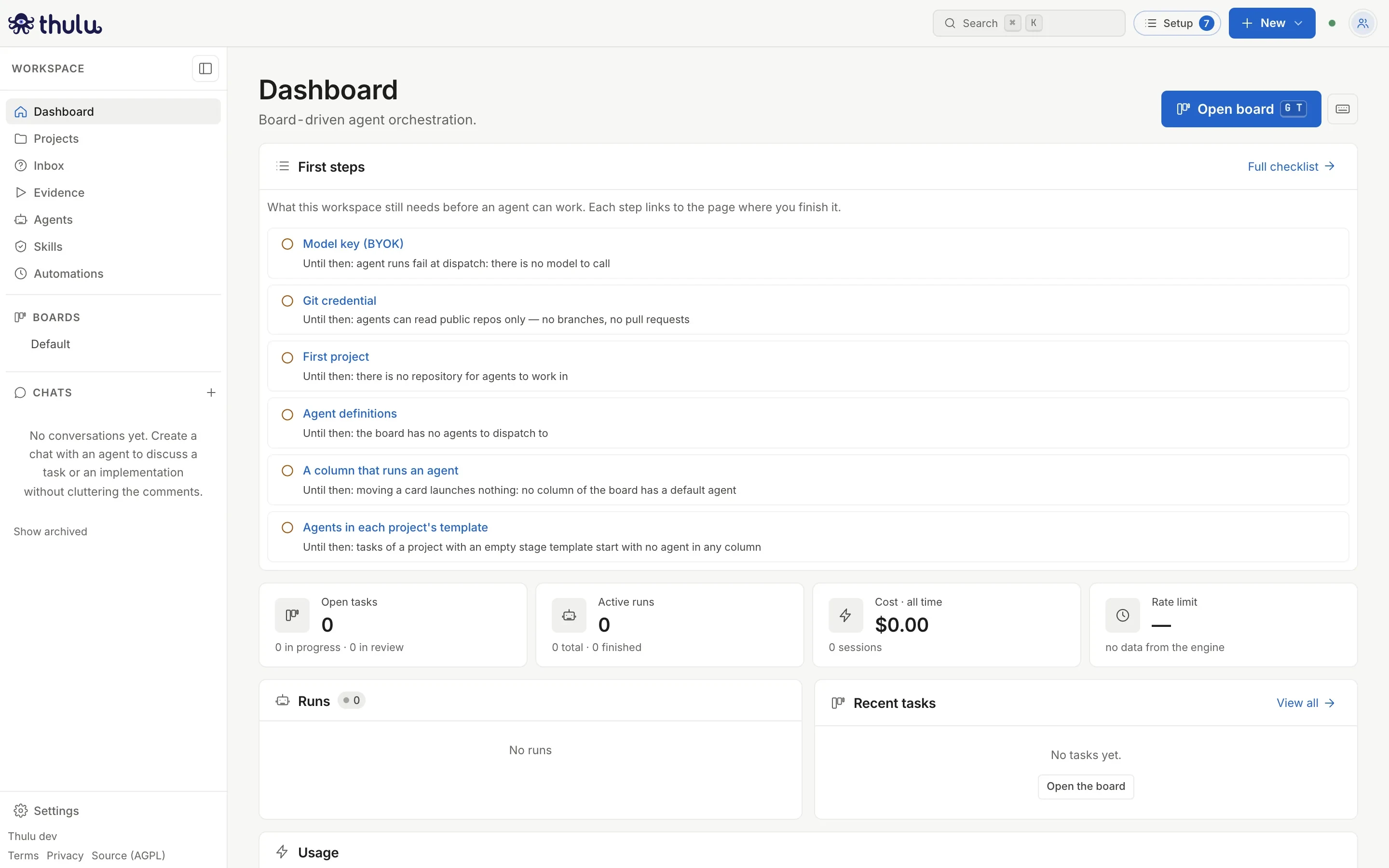
First access to an installation without login. The number on the Setup button is the items still missing. -
Complete the pending items from “Setup” (see below). For an agent to work you need the model key, a project, an agent and a column with that agent. No agent comes installed.
What thulu init asks
Section titled “What thulu init asks”At “How do you want to install?” there are three modes:
| Mode | What it is |
|---|---|
| “Quick, on this machine” | Docker with the published image, no login and only on 127.0.0.1:8585. It asks about engines, runner and GitHub. |
| “Custom Docker” | You choose how it is published, how people get in, the database and the MCP servers. Agents run in containers of this Docker. |
| “Kubernetes / k3s” | Writes the Helm chart’s values. Agents run as isolated pods in microVMs (Kata by default). |
Outside quick mode, the wizard moves through sections. Some appear only depending on what you answered before.
| Section | What it asks | Default |
|---|---|---|
| How do people log in? | “Identity”: OIDC provider, GitHub OAuth app or “No login (local only)”. For OIDC: issuer URL, Client ID, Client secret, button text, allowed email domains, groups claim and mapping of groups to roles. | “No login” on the stack without a domain; OIDC on the domain stack with HTTPS, where “No login” isn’t offered |
| Postgres | On Docker, whether to use the Postgres the stack ships. If not, or on Kubernetes, the DSN of an external database, and it tests whether it answers. | The stack’s Postgres |
| Public address | Domain (host only), the addresses the dashboard is opened from, the IP of the proxy or ingress in front of it and, on the stack without a domain, the address it listens on. It rejects a domain with a scheme or path and an origin that isn’t http(s)://host. With OIDC or OAuth it gives you the redirect URI to register with the provider. |
localhost on Docker |
| Cluster and isolation | Kubernetes only: namespace, Helm release name, agent isolation (kata-clh, gvisor or no RuntimeClass) and agent image. It warns if the RuntimeClass isn’t installed. |
octopus, kata-clh |
| MCP servers for agents | A checklist of the native MCPs (see below). | octopus-api, argus-github and argus-browser |
| Enterprise license (optional) | The license key. Without it, the community edition runs. On Kubernetes it is required (see Kubernetes). | Skipped |
| First workspace | The workspace name (the slug comes from the name) and the owner’s email. With login, also your email at the identity provider, to run the workspace. | Default; with no login, the email from your git config |
| Engines | Which CLI each agent runs and its credential. | Claude Code |
| Runner on this machine | Docker only: whether agents can also run on this machine, outside the containers. | No |
| GitHub | The GitHub Enterprise Server URL if you use one, and the token so agents can clone and push. | Skipped |
In Engines the list also offers Codex (with an OpenAI key) and OpenCode (OpenAI-compatible APIs). Both run agents and auditors; messages to a running agent and the runner need Claude Code. See Credentials and engines.
Two secrets are generated on their own and never asked for: the one that signs sessions and the one that encrypts stored credentials. Running thulu init again keeps them; if you lost the second, every stored credential would become unreadable.
The Docker stacks
Section titled “The Docker stacks”At “Custom Docker” the wizard offers two stacks, both with the published image:
| Stack | What it is | When |
|---|---|---|
“Server with a domain and HTTPS” (docker-compose.caddy.yml) |
Daemon, Postgres and Caddy in front, which gets the certificate for your domain on its own. Ports 80 and 443 have to reach the machine. | A server with a public domain. |
“Only on this machine, or behind your own proxy” (docker-compose.standalone.yml) |
The image and Postgres, with nothing in front, on port 8585. It listens on 127.0.0.1 unless you set another address. |
To try it on your machine, or behind your own reverse proxy that ends TLS. |
“No login” is offered only on the stack without a domain, because there the wizard can keep the port on 127.0.0.1. If you publish that stack on another address, the summary warns that it serves plain HTTP and leaves TLS pending.
The MCP checklist
Section titled “The MCP checklist”| Server | What it does | Default |
|---|---|---|
octopus-api |
The board for agents: read and update tasks, comments and attachments. It acts with the run’s own key. | Checked |
argus-github |
GitHub: pull requests, commits, branches, Actions runs. | Checked |
argus-browser |
Headless Chromium (Playwright): browse, click, screenshots attached to the task. | Checked |
argus-cloud |
Read-only cloud metrics and logs (GCP, AWS). Needs a cloud credential per environment. | Unchecked |
argus-figma |
Read-only Figma files, frames, renders and comments. Needs a Figma token in Credentials. | Unchecked |
argus-sandbox isn’t in the list because it ships inside the daemon. Each checked server runs as one more container of the stack (on Kubernetes, as a Deployment of the chart). To change the selection, run thulu init again: the checklist starts with what is already installed. Which tools each server grants to each agent is decided later, in the dashboard: see MCPs.
If you uncheck all of them, agents have only the sandbox’s tools: they can’t comment on the task, open PRs or use the browser.
First access
Section titled “First access”How you get in depends on what you chose in Identity.
The daemon stores a random token. The link http://localhost:8585/?token=… swaps it for a session cookie that lasts 30 days. To open it again:
thulu openIt prints the link and opens the browser. It reads the token from deploy/.env, so run it from the installation folder, or from anywhere if the installation is in ~/.octopus. If you go to the address without the token, the dashboard sends you to the login with this instruction:
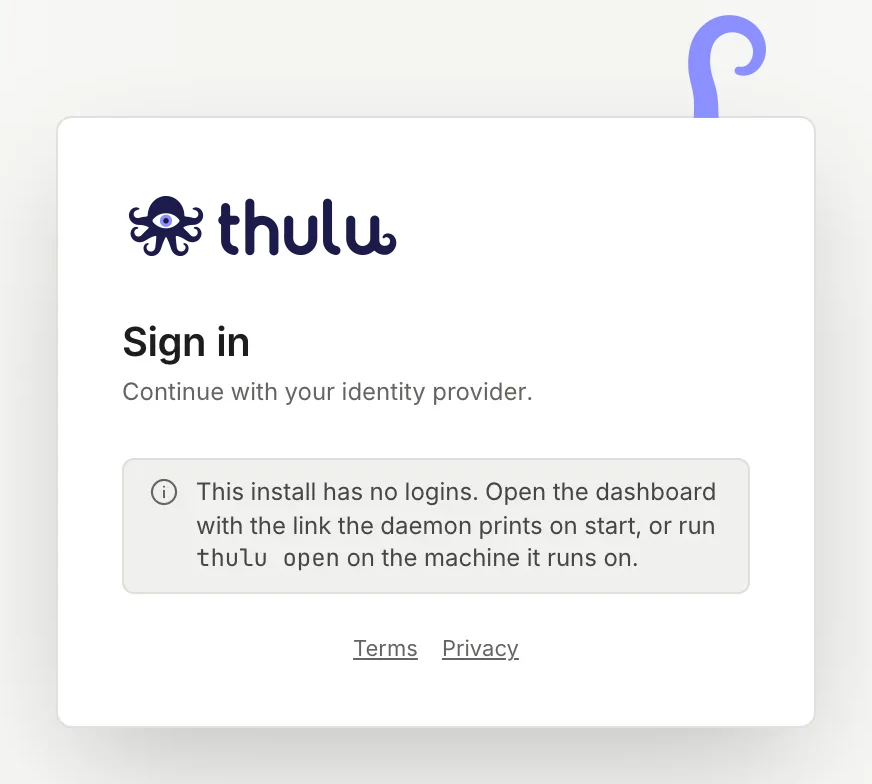
Any request with that cookie is treated as owner. That is why the port stays on 127.0.0.1 and you shouldn’t publish it on another address.
You get in through the domain’s address (https://<domain>) and the login page shows the button with the text you chose (“Continue with Google”, for example).
Before the first login, register in the provider the URL the wizard printed:
- OIDC:
https://<domain>/auth/oidc/callback - GitHub OAuth app:
https://<domain>/github/oauth/callback
The owner email the wizard asks for stays as the workspace’s provisional owner and nobody signs in with it. If at “First workspace” you entered your identity provider email, the wizard invites you as owner (“invited to own …: their first sign-in hands it over”) and when you sign in the workspace becomes yours.
If you skipped it, the first login lands on “Your account is waiting for access”. Since you are the first person in, the screen shows the command that invites you with the wizard’s key: run it in a terminal with OCTOPUS_API_KEY and OCTOPUS_OPERATOR_WORKSPACE exported (the value of the second is in deploy/.env, or in extraEnv of the Helm values) and sign in again.
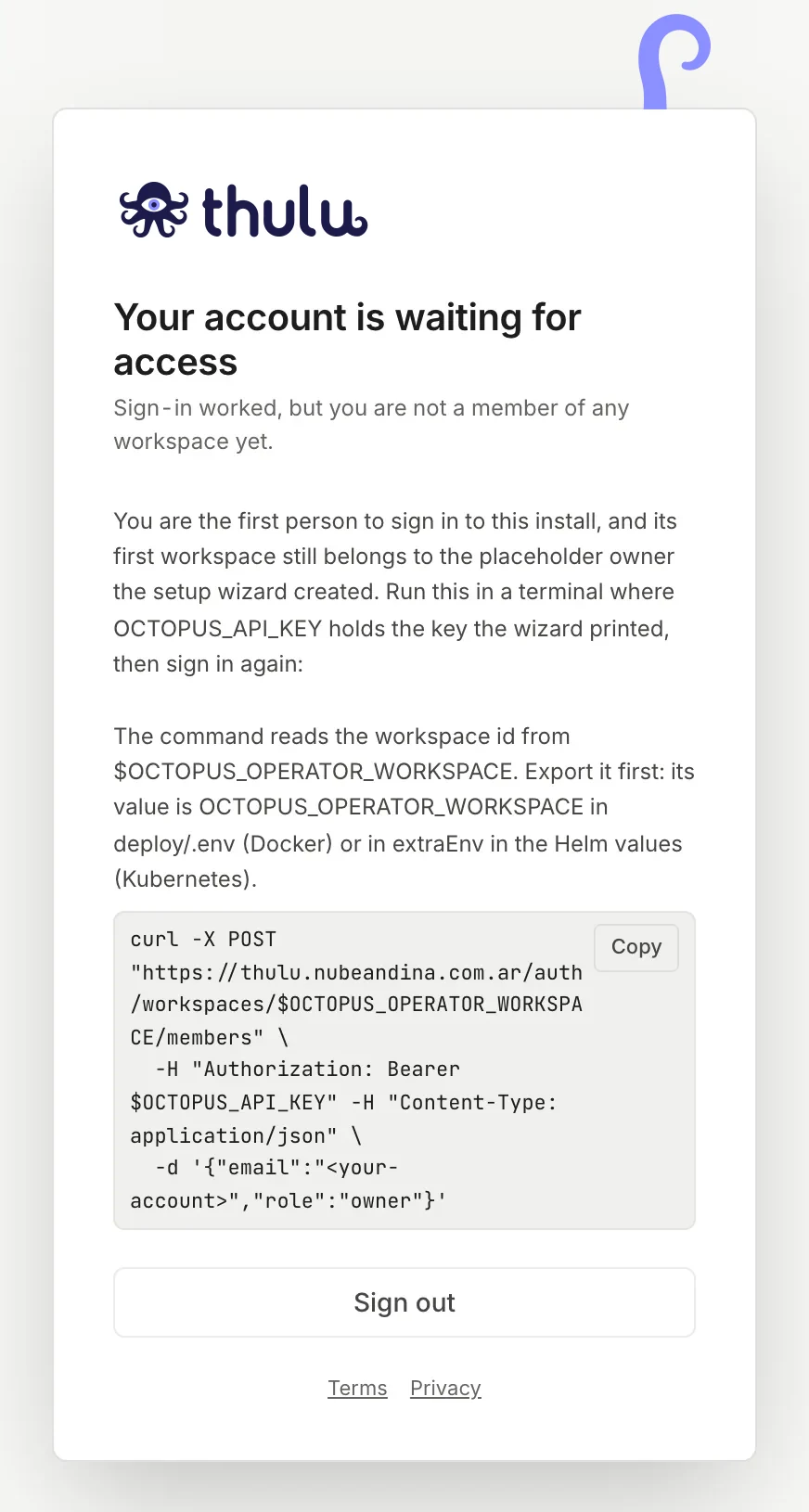
Whoever signs in afterwards waits for an invitation: on your own installation the login doesn’t create personal workspaces, unless you set OCTOPUS_ALLOW_PERSONAL_WORKSPACES=1. Invitations are made from the dashboard (see Workspaces and team). For each new person to get into a workspace on their own, add OCTOPUS_SSO_DEFAULT_WORKSPACE=<slug> to deploy/.env (and optionally OCTOPUS_SSO_DEFAULT_ROLE, which defaults to viewer) and recreate the stack with docker compose -f deploy/<stack>.yml up -d. Running the wizard again keeps that variable.
If you left the allowed domains list empty, anyone the provider authenticates can get in. On a multi-tenant provider (Google, Entra ID’s common endpoint) that means anyone with an account.
Complete the Setup
Section titled “Complete the Setup”The “Setup” page (/onboarding/) reads the installation’s real state and lists what is missing, what happens in the meantime and where to finish it. An item you complete by hand later counts the same. The top bar button is visible only to admins and disappears when nothing is left. The Dashboard shows the same items under “First steps”.
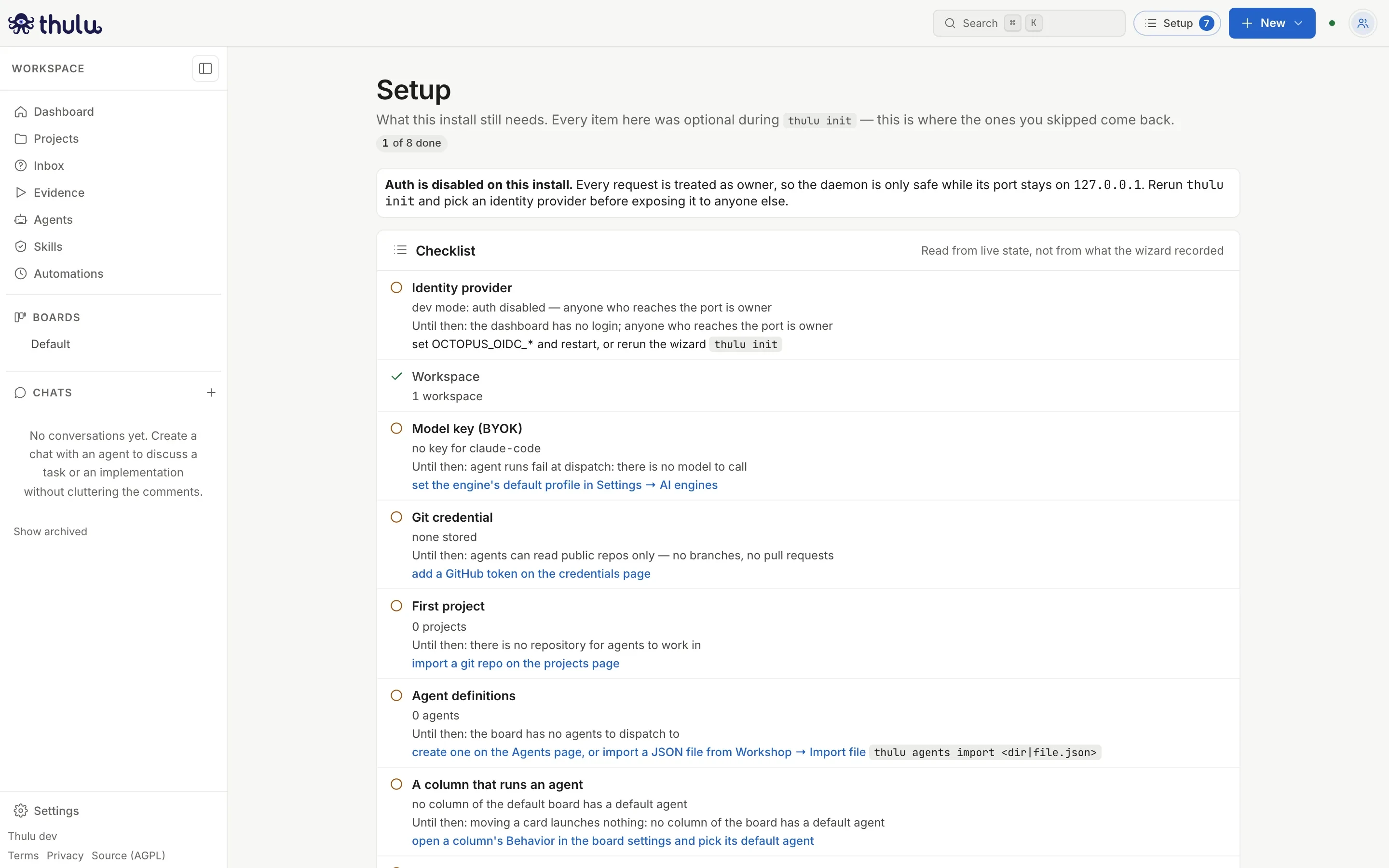
| Item | What is missing if it isn’t there | Where it is resolved |
|---|---|---|
| Identity provider | Anyone who reaches the port is owner. | Run thulu init again and pick a provider. |
| Workspace | Nothing can be created. | thulu workspace create (see CLI). |
| Model key (BYOK) | Runs fail at dispatch. | Settings → AI engines. See Credentials and engines. |
| Git credential | Agents can only read public repos: no branches or PRs. | Credentials or the GitHub App. |
| First project | There is no repository for agents to work in. | Projects: a GitHub repo or an uploaded folder. |
| Agent definitions | The board has no agents to dispatch to. | Agents, or a JSON file from Workshop → Import file. |
| A column that runs an agent | Moving a card launches nothing. | “Default agent” in the column’s Behavior (Boards and stages). |
| Agents in each project’s template | The tasks of that project are born without an agent. | The project’s “Stage template”. |
Only an admin of the operator workspace sees the first two.
Other flows
Section titled “Other flows”A server with a domain and login
Section titled “A server with a domain and login”-
Register an application in your identity provider (Okta, Entra ID, Keycloak, Google…) and note the issuer, the Client ID and the Client secret. If your provider only speaks SAML, put an intermediary that speaks OIDC in front, such as Keycloak, and use that intermediary’s issuer.
-
Point the domain’s DNS at the server and let ports 80 and 443 through.
-
On the server, run
thulu init, choose “Custom Docker” and the stack “Server with a domain and HTTPS”. -
At Identity choose the OIDC provider. The wizard connects to the issuer before moving on, so a typo fails right there:
Issuer URL: ✓ the provider answers: sign-in at https://accounts.google.com/o/oauth2/v2/auth -
Fill in Client ID, Client secret, the button text and the allowed email domains (for example
yourcompany.com). The groups claim and thegroup:rolemapping are optional: with no mapping, everyone gets in with the default role and admins are promoted by hand. -
At Public address enter the domain, without
https://. The wizard prints the redirect URI: register it in the provider before the first login. -
At “First workspace” keep the provisional owner email it proposes and, at the next question, enter your identity provider email. It has to be a different one: the wizard rejects the provisional owner’s.
-
Finish the rest as in the recommended flow, save the key and sign in at
https://<domain>once DNS and the certificate resolve.
A runner on this machine
Section titled “A runner on this machine”On Docker, the wizard asks whether agents can also run on your machine, outside the containers, with your git, your tools and your claude session. For now the runner runs only Claude Code, is configured only from the CLI (it has no dashboard screen) and isn’t offered on Kubernetes. If you answer yes, you choose the folders it can work in (each has to be a git repo and becomes a project whose code never leaves that machine) and whether to leave it running as a service. See CLI.
Kubernetes
Section titled “Kubernetes”On Kubernetes, agents run as isolated pods in microVMs (Kata) and the daemon touches no Docker socket. This runtime is validated on a single-node k3s with Kata. It needs a license that includes kubernetes: without it the daemon doesn’t start. The cluster has to be prepared first: Kata installed with its RuntimeClass, the tenant namespaces and an external Postgres database (the chart ships no database). The preparation and the variables are in docs/enterprise-setup.md, with the air-gapped checklist.
There are two ways to install the chart:
- With
thulu init, choosing “Kubernetes / k3s”. It asks the same as on Docker plus the namespace, the release and the isolation, writesdeploy/values-<release>.yamland runshelm upgrade --install … --wait --timeout 10m. That file holds the JWT secret, the credentials key and the OIDC secret in plain text: keep it out of git. - With a direct
helm installondeploy/helm/octopus, with your own values (there are examples invalues-production.example.yaml). In that case the workspace and the key are created by hand with the CLI.
The published agent images don’t include Claude Code: they install it from npm the first time. On Kubernetes the installation builds its own agent image with Claude Code inside (a BuildKit Job, once per version) and until it finishes the pods download it at startup. Without access to npm you have to build the image with CLAUDE_CODE_INSTALL=build; the steps are in docs/enterprise-setup.md. With agents on Kubernetes the Claude subscription token (sk-ant-oat…) is turned off: use an Anthropic API key, Bedrock or Vertex.
Run the wizard again
Section titled “Run the wizard again”thulu init is the way to change an answer: each question takes as its default what the installation already has (from deploy/.env and from deploy/.octopus-init.json, which stores the answers without secrets). It doesn’t issue the key again if the workspace already has an active one; an expired one doesn’t count.
| Option | What it does |
|---|---|
-dry-run |
Asks everything and shows the summary without writing or running anything. |
-non-interactive |
Takes all the defaults, or the answers from the previous run. To repeat an installation or in CI. |
-plain |
Text questions with numbered options, instead of forms. |
-stack <file> |
Picks the compose stack without asking. |
-root <dir> |
Where the installation lives. By default it searches upward from the current folder, and if there is none, ~/.octopus. |
Common problems
Section titled “Common problems”- “cannot reach it from here” in the Postgres section: the configuration is written anyway, but the workspace and the key stay pending. The summary prints the command to create them from the daemon’s container once the database answers (on compose,
docker compose -f deploy/<stack>.yml exec octopus ./octopus workspace create …and then… ./octopus keys mint …). - You lost the key or it expired after 90 days: only its hash is stored. Mint a new one with
thulu keys mint, or from the daemon’s container:docker compose -f deploy/<stack>.yml exec octopus ./octopus keys mint -workspace <id> -role owner -permissions full(more in CLI). - The first run takes longer: on Docker, Claude Code is installed from npm the first time each workspace uses it and stays in a volume. Without access to npm you have to build the agent image with
CLAUDE_CODE_INSTALL=build(docs/enterprise-setup.md). - Agents have no access to the board or to GitHub: check that the MCPs are checked in the checklist and granted to the agent in MCPs.
- After the OIDC login “Your account is waiting for access” appears and you aren’t the first person: nobody invited you to the workspace. Ask an admin to invite you, log out and sign in again.